

For families in our service areas
For families in our service areas, this guide explains caregiver support and how non-medical in-home caregiving can support care planning in East Idaho, Treasure Valley & Magic Valley, Northern Wasatch, North Central West Virginia, and Northeast Ohio.
Quick Guide to Essential Steps for Computing
The article "Essential Steps for Computing for Seniors: A Caregiver's Guide" is designed with caregivers in mind, offering practical strategies to help seniors navigate the world of computers. We understand that as a caregiver, you may often feel overwhelmed by the emotional and physical demands of your role. It’s essential to recognize that you’re not alone in this journey.
This guide emphasizes the importance of understanding basic computer components and creating an accessible setup. By learning essential software applications and troubleshooting common issues, you can empower seniors to gain confidence and independence in their digital interactions. Imagine the joy on their faces as they connect with loved ones or explore new interests online!
We know that the path can be challenging, and feelings of stress and burnout are common. But remember, every small step you take makes a significant difference in their lives. You’re providing not just technical support, but also emotional encouragement, which is invaluable.
As you assist seniors in this learning process, think of the stories you’ve heard from other caregivers. They often share how a simple breakthrough in technology can lead to newfound joy and connection for their loved ones. These moments are what make your efforts worthwhile.
In conclusion, while the journey may have its ups and downs, your role as a caregiver is crucial. With patience and the right tools, you can help seniors thrive in the digital world. Keep nurturing that spirit of compassion, and know that you are making a lasting impact.
Why Essential Steps for Computing Matters
As the digital age continues to evolve, we must recognize the profound importance of technological proficiency among seniors. Many older adults express a heartfelt desire for assistance in navigating computers, and this is where caregivers truly shine. They play a pivotal role in bridging this gap, offering the support that can make all the difference.
This guide is here to provide essential steps that empower seniors to embrace technology. By doing so, we enhance their independence and connectivity, allowing them to engage more fully with the world around them. Yet, we must also acknowledge the challenges that come with this journey. Unfamiliar software and common technical issues can be daunting. So, how can caregivers effectively support their loved ones in mastering this digital landscape?
Together, we can explore compassionate solutions that not only address these challenges but also foster a sense of confidence and capability in our seniors. Let's embark on this journey with empathy and understanding, ensuring that no one feels left behind in this rapidly changing world.
Understand Basic Computer Components and Functions
To start, let’s take a moment to understand the essential components of a computer:
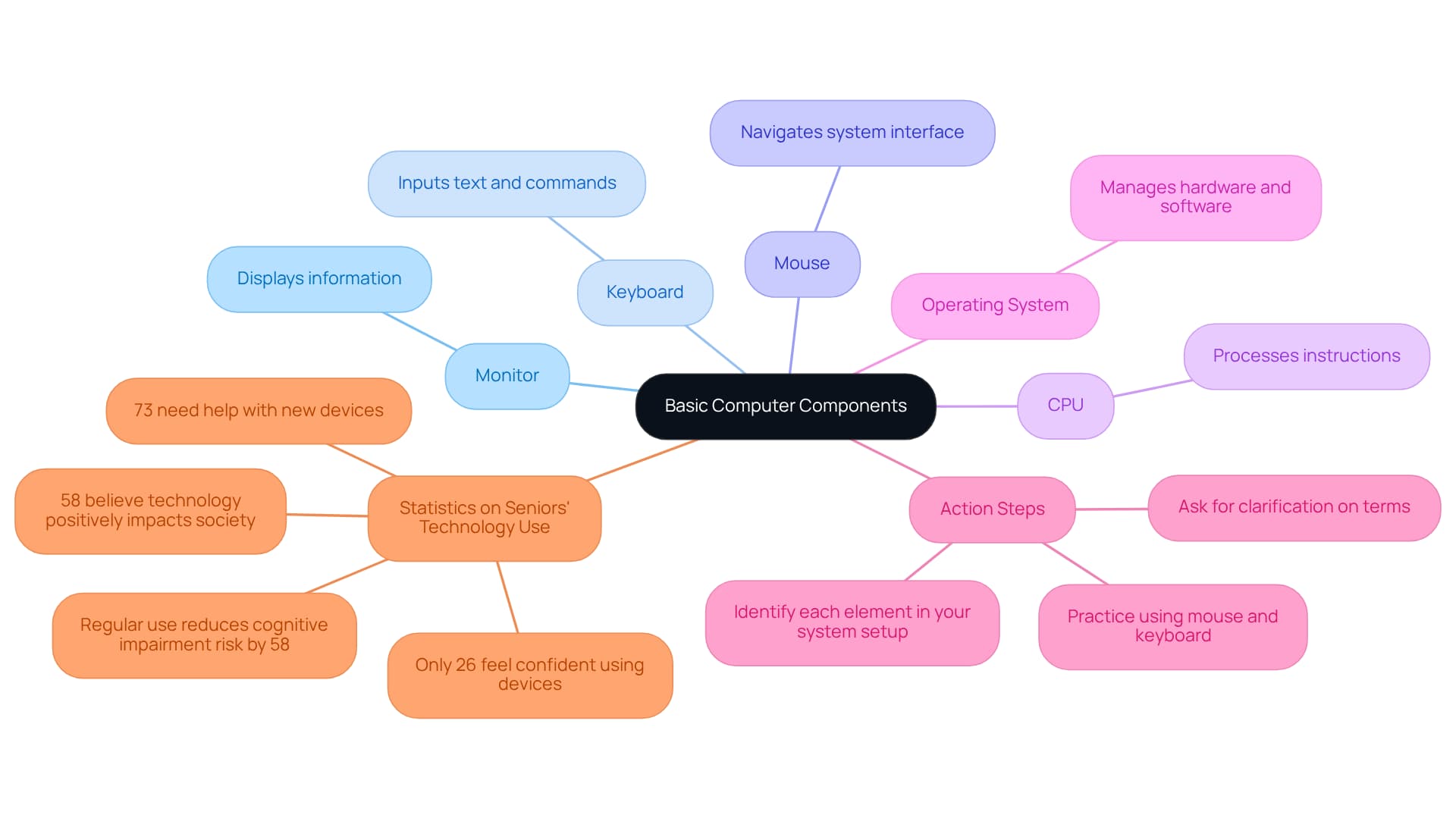
- Monitor: This is the screen that displays all the information you need.
- Keyboard: The device you use to input text and commands.
- Mouse: A handy pointing device that helps you navigate the system interface.
- CPU (Central Processing Unit): Often referred to as the brain of the machine, it processes all the instructions you give.
- Operating System: This is the software that manages both hardware and software resources (like Windows or macOS).
Action Steps:
- Take a moment to identify each element in your system setup.
- Practice using the mouse and keyboard to open programs and navigate the desktop.
- Don’t hesitate to ask your support person to clarify any terms or functions that seem puzzling. It’s important to understand how each component contributes to the overall operation of your computer.
Understanding these basics is so important. Studies show that regular use of digital technology can reduce the risk of cognitive impairment by 58%. Additionally, 73% of individuals aged 65 and above indicate they need assistance with computing for seniors and new devices. This highlights the crucial role of support providers in the computing for seniors learning journey. Moreover, 58% of older adults believe technology positively impacts society, which can encourage interaction with digital tools. It’s also worth noting that only 26% of individuals aged 65 and older feel very confident in computing for seniors when it comes to operating electronic devices. This indicates that caregivers should be ready to offer tailored support, especially in computing for seniors.
As technology becomes more integrated into our daily lives, grasping these fundamentals not only enhances your independence but also fosters confidence in using digital tools. Remember, you’re not alone in this journey, and with the right support, you can navigate the digital world with ease.
Set Up Your Computer for Easy Access
Creating an accessible computing for seniors setup can truly make a difference in their daily lives. Here are some thoughtful steps to consider:
-
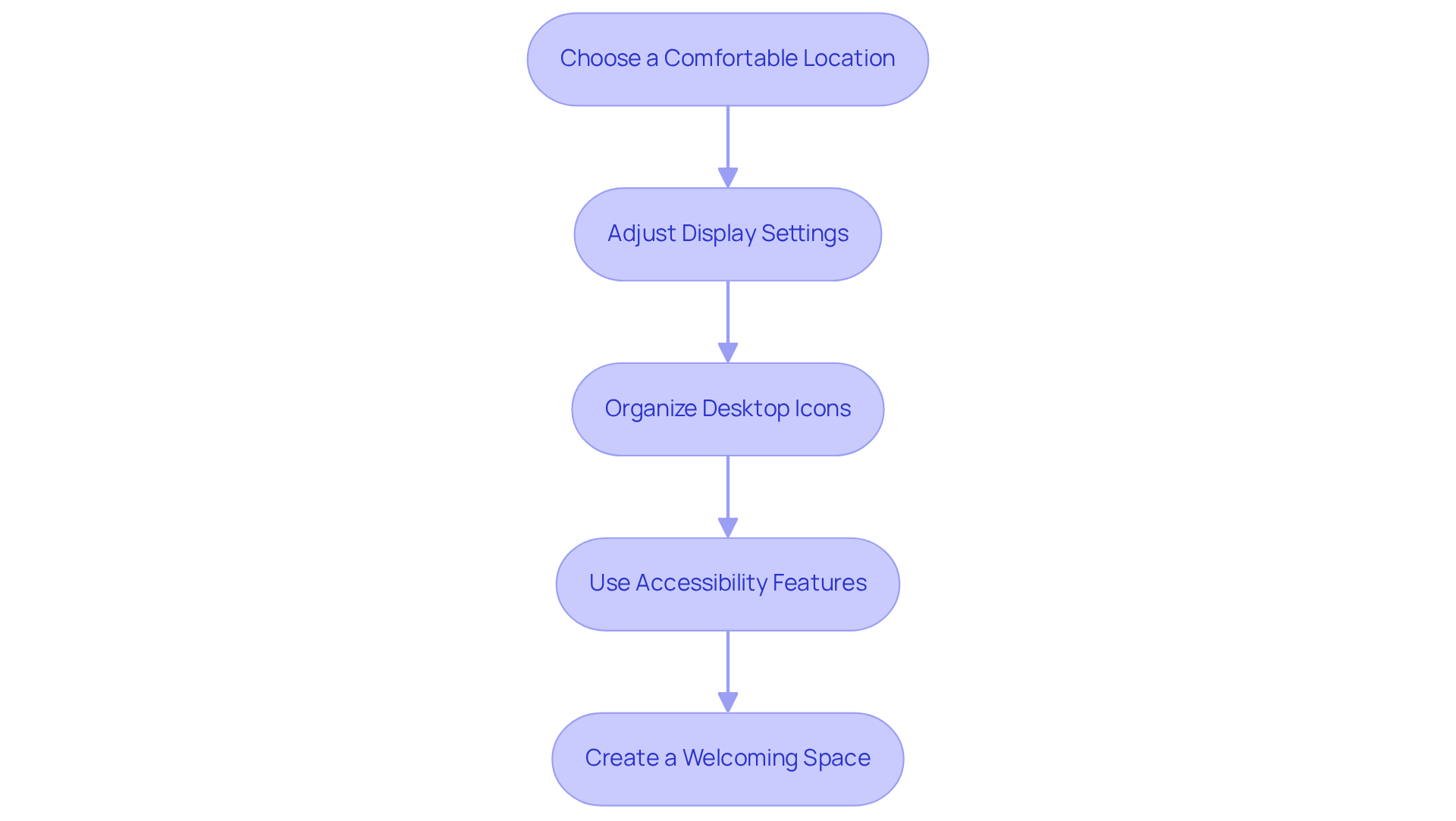
Choose a Comfortable Location: It’s important to place the device at a height that’s easy to reach while seated. A sturdy chair with good back support can make all the difference, ensuring comfort during use.
-
Adjust Display Settings: Increasing the font size and adjusting the screen brightness can greatly enhance visibility. These simple changes can usually be made in the display settings of the operating system, catering to individual vision needs.
-
Organize Desktop Icons: Arranging frequently used applications on the desktop allows for quick access. Creating folders for less frequently used programs can help reduce clutter, making navigation feel less overwhelming.
-
Use Accessibility Features: Don’t forget to take advantage of built-in accessibility options like voice commands, screen magnifiers, and text-to-speech functions. These tools can significantly enhance usability in computing for seniors, making technology feel more approachable.
Action Steps:
- Adjust the chair and desk height to ensure comfort and proper posture.
- Change display settings to suit individual vision requirements.
- Organize the desktop by grouping icons into folders for easier access.
- Explore free resources for improving computer skills, such as senior-focused tech classes at local community centers or libraries.
By taking these steps, you’re not just setting up a computer; you’re creating a welcoming space that encourages independence and confidence in using technology.
Learn Essential Software Applications for Daily Use
Seniors can truly benefit from computing for seniors, as it helps them learn to use various software applications that enhance their connectivity and independence. Here are some essential tools to consider:
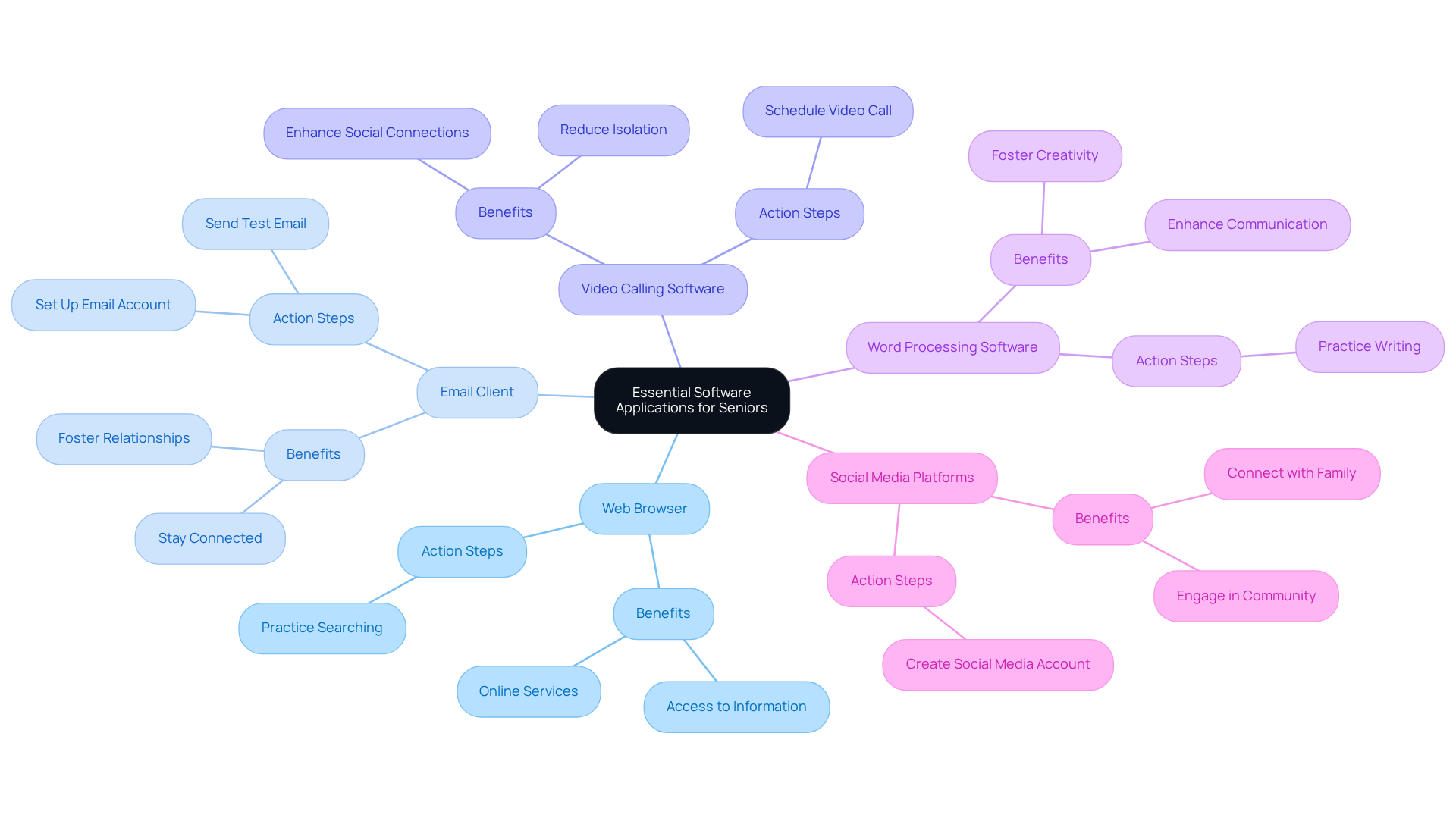
- Web Browser (e.g., Chrome, Firefox): This allows browsing the internet, searching for information, and accessing online services, opening up a world of possibilities.
- Email Client (e.g., Gmail, Outlook): Sending and receiving emails helps older individuals stay connected with family and friends, fostering those important relationships.
- Video Calling Software (e.g., Zoom, Skype): Virtual visits with loved ones can significantly reduce feelings of isolation. Research shows that video calling enhances social connections, with 35% of elderly users having utilized these platforms for telehealth appointments. Additionally, 28% of older adults in the U.S. have turned to telehealth services, highlighting the importance of these tools in healthcare environments.
- Word Processing Software (e.g., Microsoft Word, Google Docs): Writing letters, notes, or keeping a journal can foster creativity and communication, enriching daily life.
- Social Media Platforms (e.g., Facebook): These platforms connect seniors with family and friends, enabling them to share updates and engage in community discussions. Notably, half of people aged 65 and older use Facebook regularly, underscoring its role in maintaining relationships.
Action Steps:
- Start by opening a web browser and practicing how to search for information. It’s a great first step!
- With the help of a caregiver, set up an email account and send a test email to a family member. This can be a fun way to connect.
- Schedule a video call with a loved one to practice using video calling software. These interactions are so important for emotional well-being.
- Consider utilizing the ElliQ Digital Care Companion, which engages elderly individuals in conversation and activities, helping to combat loneliness.
By engaging in computing for seniors, older adults can improve their daily lives, stay connected, and maintain their independence. However, it’s important to recognize that 29% of seniors find online banking difficult. While technology offers many benefits, challenges remain that we must address together.
Troubleshoot Common Issues and Seek Help
Troubleshooting common computer issues can feel overwhelming, especially for caregivers. Here are some steps to help you navigate these challenges with confidence:
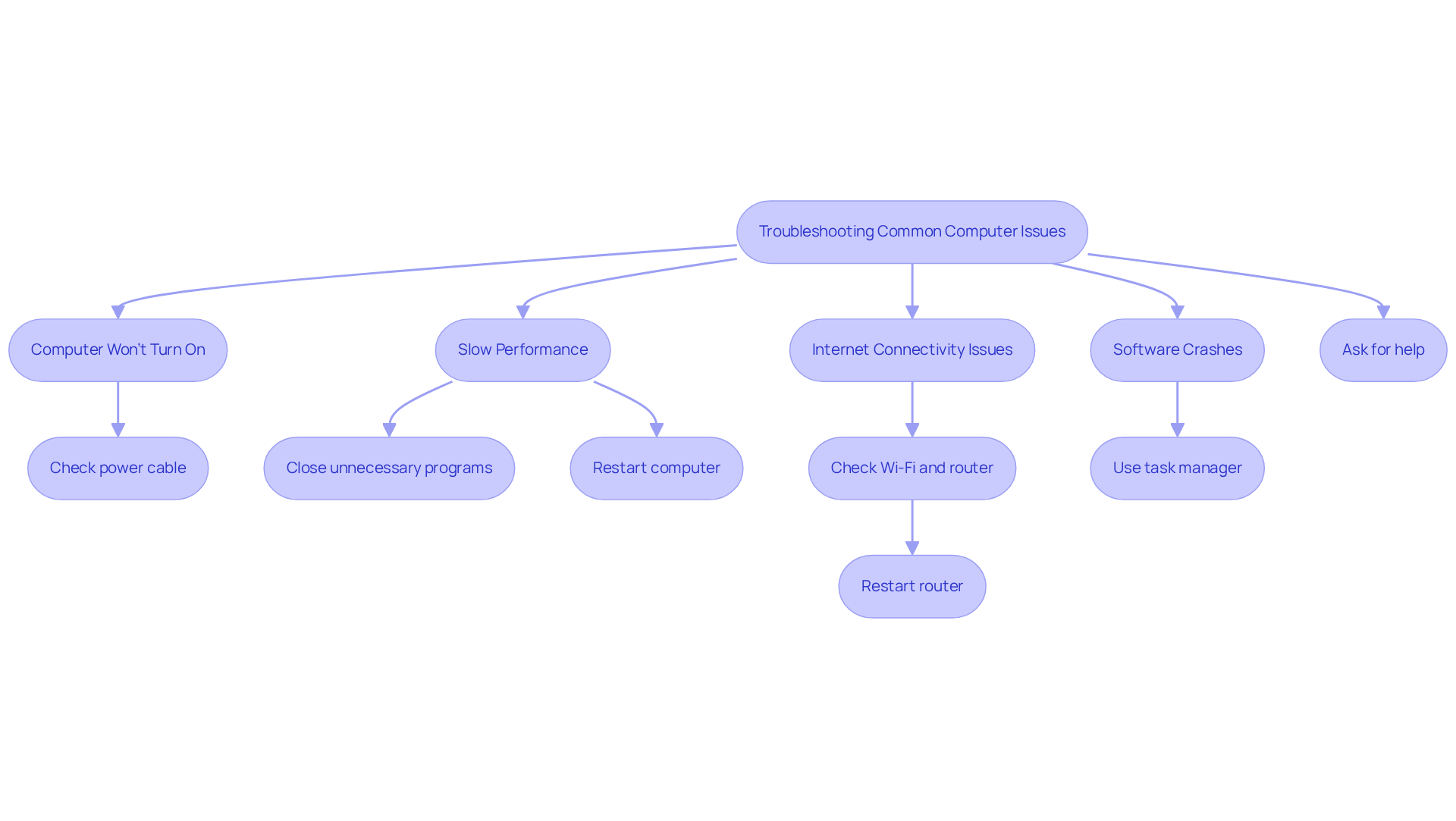
- Computer Won't Turn On: First, check that the power cable is securely plugged in and that the outlet is working. If you’re dealing with a laptop, make sure the battery is charged.
- Slow Performance: If your computer is running slowly, try closing any unnecessary programs that might be running in the background. A simple restart can refresh its memory and often improve speed.
- Internet Connectivity Issues: Ensure that Wi-Fi is enabled and that your router is operational. If you’re still having trouble, restarting the router can often resolve connectivity issues.
- Software Crashes: When an application becomes unresponsive, don’t panic. Use the task manager (Ctrl + Shift + Esc) to close it, then reopen the application.
- If these issues persist, don’t hesitate to reach out to a family member or friend for support. Online forums and tech support websites, like Candoo Tech or the National Senior Planet Hotline, can also be valuable resources.
Action Steps:
- Regularly practice troubleshooting these common issues to build your confidence. It’s okay to ask for help!
- Keep a list of helpful contacts, including family members and tech support services, for quick reference when problems arise.
- Consider utilizing resources like the Virginia Assistive Technology System or Area Agencies on Aging for additional support and training opportunities for older adults.
Statistics show that 62% of individuals aged 50-64 need help with new devices. This highlights the importance of having support providers who can deliver tech assistance. Additionally, 41% of older adults in this age group feel very assured with electronic devices. By being proactive and familiar with these troubleshooting techniques, caregivers can significantly enhance the technology experience for seniors, fostering their independence and confidence in using digital tools.
Making the Right Choice
Understanding the essential steps for computing can truly empower seniors, boosting their confidence and independence in the digital world. It’s vital for caregivers to play a supportive role in this learning journey, helping older adults not only become familiar with basic computer components but also feel comfortable navigating the technology that enriches their lives.
Creating an accessible computing environment is crucial. Learning vital software applications for everyday use and mastering troubleshooting techniques for common issues can make a world of difference. Thoughtful setups and user-friendly software allow seniors to maintain meaningful connections with loved ones and engage more fully with their communities. The statistics reveal the challenges faced by older adults, highlighting the critical role of support in overcoming these obstacles.
Ultimately, embracing technology goes beyond just learning to use a computer; it’s about fostering a sense of connection and independence. Caregivers are encouraged to take proactive steps in providing support and resources, ensuring that seniors can confidently navigate the digital landscape. By doing so, they contribute to a more inclusive society where technology serves as a bridge to lasting relationships and an enhanced quality of life.
https://iframe.tely.ai/cta/eyJhcnRpY2xlX2lkIjogIjY5MGQzNmFlMjhlMjExYTRhNzdjMTI2ZCIsICJjb21wYW55X2lkIjogIjY4ZWU1ZGNhNzMxNzYyNTU3ZjNjOTVjMSIsICJpbmRleCI6IG51bGwsICJ0eXBlIjogImFydGljbGUifQ==Frequently Asked Questions
What are the essential components of a computer?
The essential components of a computer include the monitor (screen), keyboard (input device), mouse (pointing device), CPU (Central Processing Unit), and the operating system (software that manages hardware and software resources).
What is the function of the CPU in a computer?
The CPU, often referred to as the brain of the machine, processes all the instructions given to the computer.
Why is it important to understand basic computer components?
Understanding basic computer components is crucial as it enhances independence, fosters confidence in using digital tools, and helps reduce the risk of cognitive impairment through regular use of technology.
How can seniors benefit from learning about computers?
Learning about computers can help seniors maintain cognitive health, improve confidence in using technology, and encourage interaction with digital tools, which is positively viewed by many older adults.
What percentage of seniors feel they need assistance with computing?
73% of individuals aged 65 and above indicate they need assistance with computing for seniors and new devices.
What should caregivers do to support seniors in learning about technology?
Caregivers should be ready to offer tailored support, clarify terms, and help seniors practice using devices to enhance their understanding and confidence in computing.
What impact does technology have on older adults according to the article?
The article states that 58% of older adults believe technology positively impacts society, which can encourage them to interact with digital tools.