
For families in our service areas
For families in our service areas, this guide explains caregiver support and how non-medical in-home caregiving can support care planning in East Idaho, Treasure Valley & Magic Valley, Northern Wasatch, North Central West Virginia, and Northeast Ohio.
What You Need to Know About Help with Technology
Navigating the digital landscape presents a significant challenge for seniors. Many grapple with cognitive barriers and physical limitations that hinder their ability to engage with technology. These hurdles can lead to frustration and isolation, making it essential for caregivers to step in and provide support.
Caregivers hold the key to bridging the gap between seniors and technology. By employing effective strategies, they can empower older adults, fostering not only their technological skills but also their confidence and independence. This article explores practical solutions that caregivers can implement to transform frustration into familiarity, ensuring that seniors can thrive in a digital world.
Understand the Technology Challenges Seniors Face
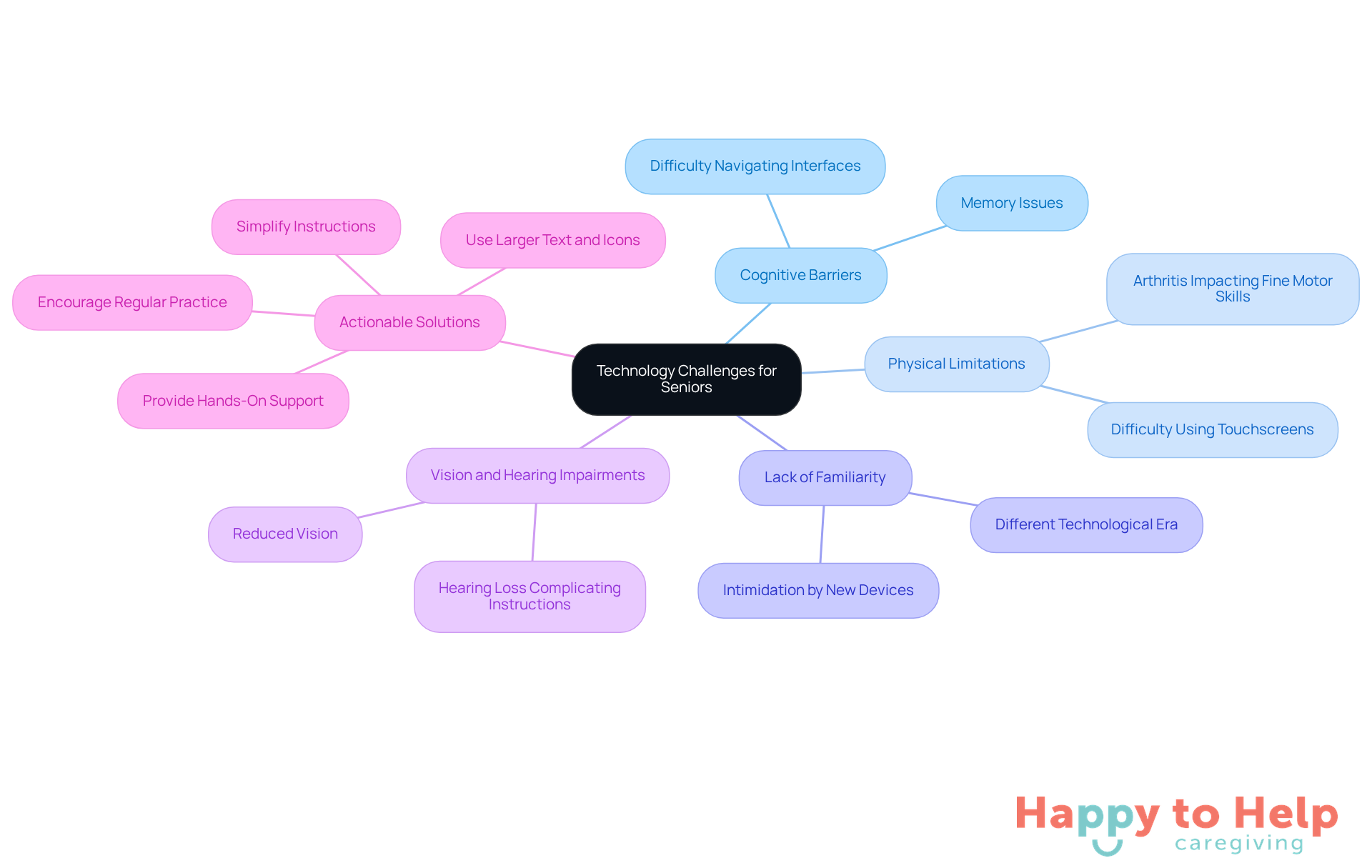
Seniors often face significant challenges, highlighting the need for help with technology for seniors. These challenges can include:
- Cognitive Barriers: Many seniors struggle with memory issues, making it difficult to remember passwords or navigate new interfaces.
- Physical Limitations: Conditions such as arthritis can hinder fine motor skills, complicating the use of touchscreens or typing on keyboards.
- Lack of Familiarity: Having grown up in a different technological era, many older adults find smartphones, tablets, or computers intimidating and frustrating.
- Vision and Hearing Impairments: Reduced vision can make it hard to read small text or see icons, while hearing loss complicates audio-based instructions.
By acknowledging these obstacles, caregivers can help with technology for seniors by approaching training with patience and understanding. Here are some actionable solutions:
- Simplify Instructions: Break down tasks into smaller, manageable steps to help seniors grasp new concepts more easily.
- Use Larger Text and Icons: Adjust settings on devices to increase text size and icon visibility, aiding those with vision impairments.
- Provide Hands-On Support: Offer direct assistance during technology use, allowing seniors to practice in a supportive environment.
- Encourage Regular Practice: Foster a routine that encourages seniors to use technology frequently, helping to build their confidence and familiarity.
By implementing these strategies, caregivers can create a supportive learning atmosphere that helps with technology for seniors, empowering older adults to navigate it with greater ease.
Implement Effective Communication Techniques
To effectively help with technology for seniors, caregivers face a significant challenge: many older adults struggle with understanding complex concepts. This can lead to frustration and hinder their ability to engage with new tools.
To address this issue, caregivers can implement several practical techniques:
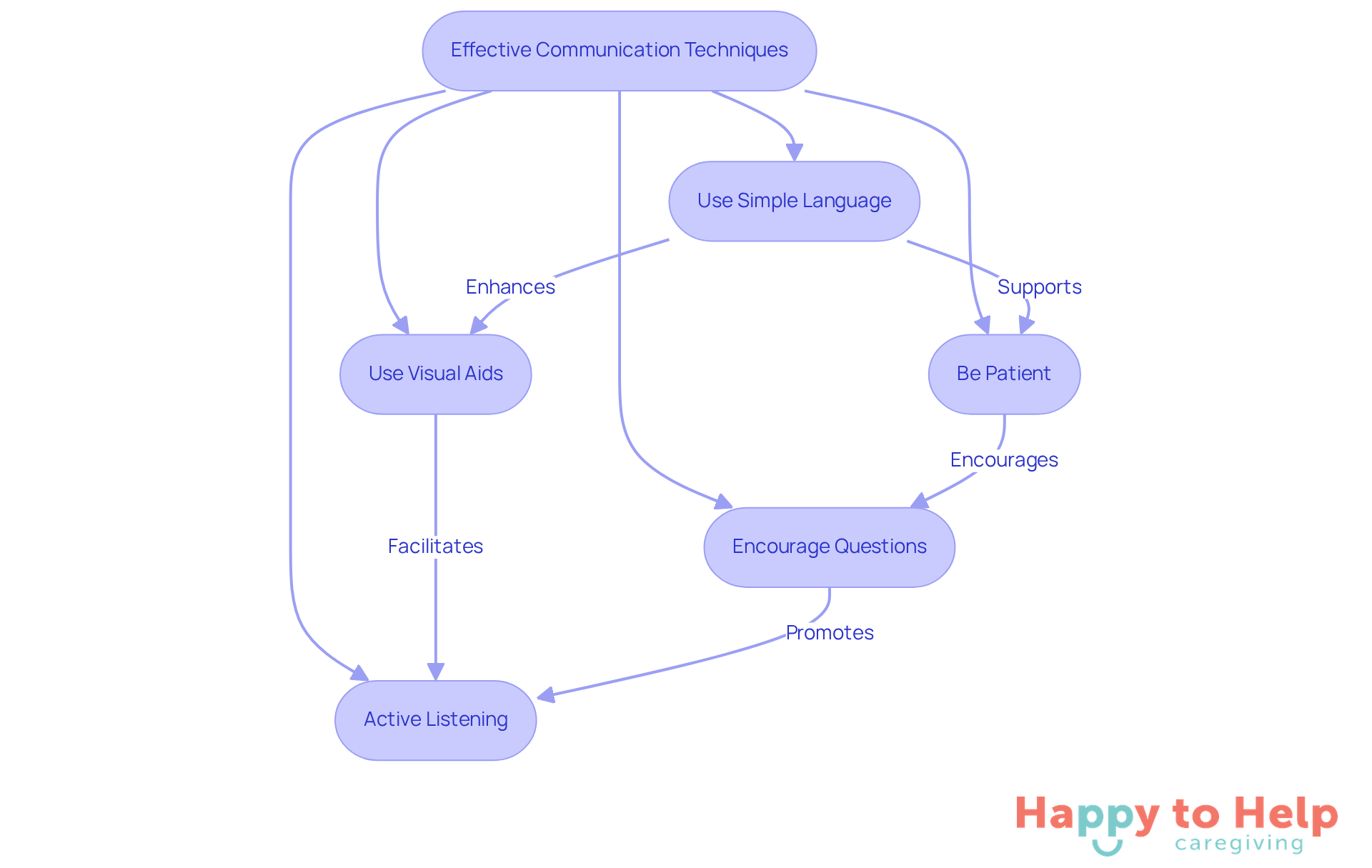
- Use Simple Language: Avoid technical jargon and explain concepts in straightforward terms.
- Be Patient: Allow older individuals ample time to process information and respond. Repetition may be necessary.
- Use Visual Aids: Demonstrate tasks visually, using diagrams or step-by-step guides to reinforce learning.
- Encourage Questions: Create an open environment where individuals feel comfortable asking questions without fear of judgment.
- Active Listening: Show that you value their input by listening attentively and responding to their concerns.
These methods promote a constructive educational environment that helps with technology for seniors, facilitating their understanding of new tools.
Utilize Helpful Tools and Resources for Technology Support
Caregivers face a significant challenge: many seniors struggle to navigate technology effectively. This issue can lead to feelings of frustration and isolation among older adults, hindering their ability to stay connected and independent. As the demand for digital literacy grows, it’s crucial for caregivers to find effective solutions that can help with technology for seniors in this area.
To address this problem, caregivers can leverage a variety of tools and resources:
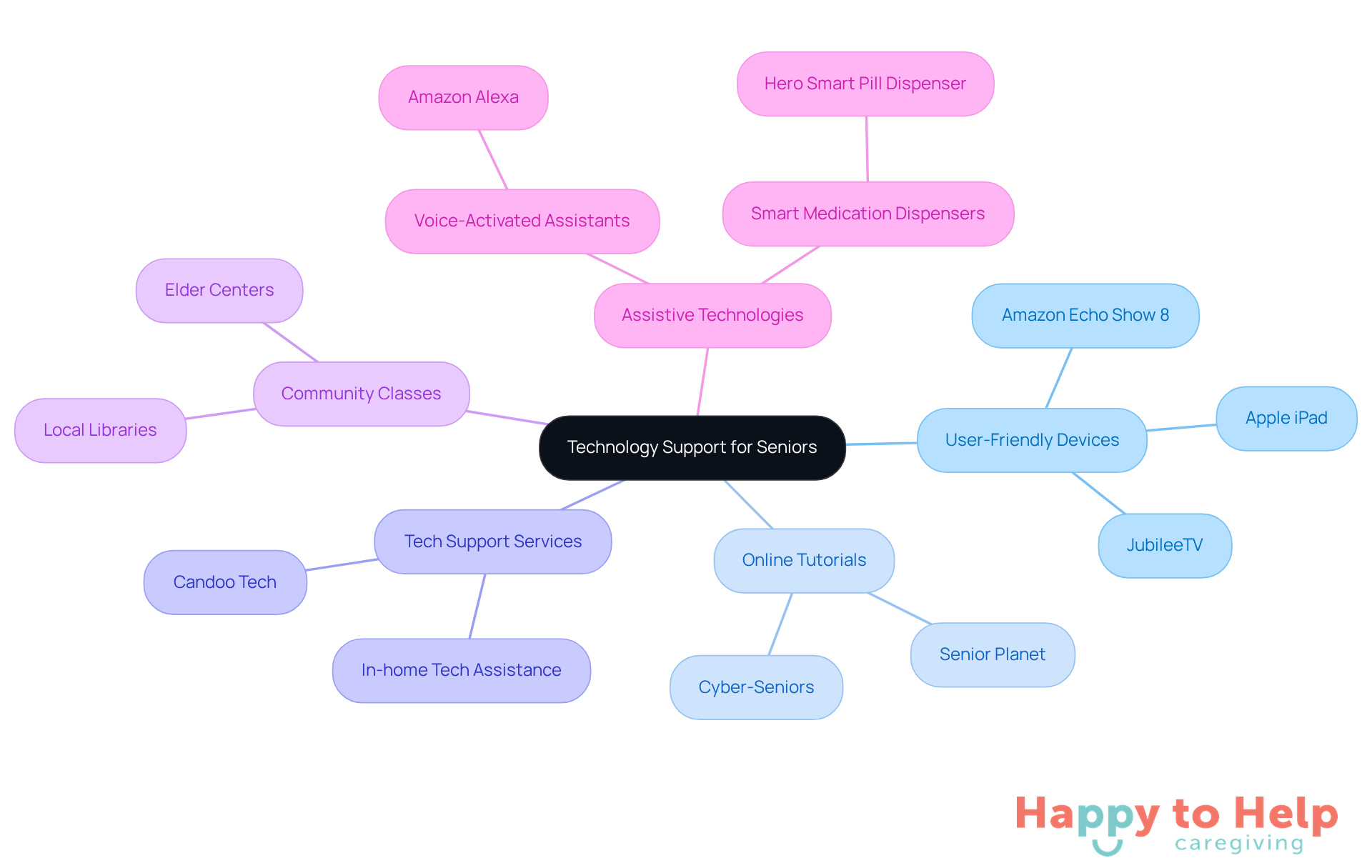
- User-Friendly Devices: Opt for devices designed specifically for seniors. Look for features like larger buttons and simplified interfaces that enhance usability. For example, the Apple iPad, with its large touchscreen and Siri voice control, is ideal for video calls and smart-home management.
- Online Tutorials: Platforms such as Cyber-Seniors and Senior Planet offer free, customized resources and tutorials. These enable older adults to learn at their own pace, building confidence in their digital skills. A 2024 AARP survey reveals that over three-quarters of individuals aged 50 and above intend to remain in their homes as they age, underscoring the importance of digital literacy.
- Tech Support Services: Companies like Candoo Tech provide in-home and remote tech assistance. This support helps elderly individuals resolve problems as they arise, ensuring they feel supported throughout their digital journey.
- Community Classes: Local libraries and elder centers often host digital courses. These classes provide hands-on learning experiences that promote interaction and practical application of skills.
- Assistive Technologies: Tools like voice-activated assistants, such as Amazon Alexa, allow older adults to perform tasks effortlessly. This eliminates the need to navigate complex interfaces, enhancing their independence. Nursing expert Olivia Wolfe notes, "The future of aging is progressively focused on in-home care, where assistive tools allow older adults to live autonomously and comfortably for an extended period."
By utilizing these resources, caregivers can help with technology for seniors, empowering older individuals to become more confident and self-sufficient in their use of digital tools. This approach not only addresses the growing need for digital literacy among the elderly but also fosters a sense of independence and connection.
Troubleshoot Common Technology Issues for Seniors
When seniors encounter technology issues, it can be a significant challenge for both them and their caregivers, which emphasizes the necessity to help with technology for seniors. Many older adults may feel frustrated or overwhelmed, which can hinder their confidence and independence in using devices.
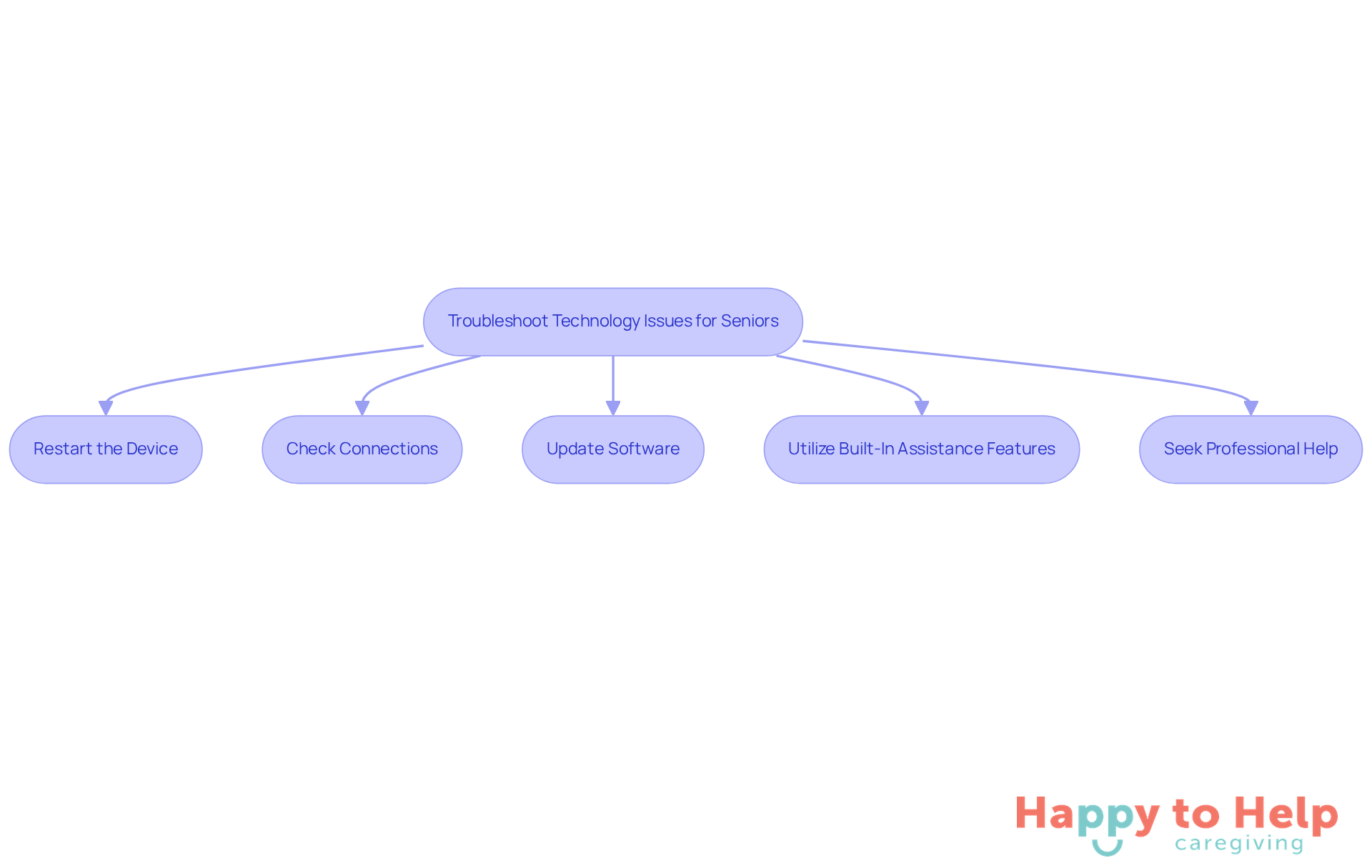
To address these challenges, caregivers can follow these essential troubleshooting steps:
- Restart the Device: A simple restart can resolve many issues by clearing temporary glitches. Studies indicate that rebooting devices can resolve up to 70% of typical tech issues, establishing it as a vital first step.
- Check Connections: Ensure that all cables are securely connected and that devices are adequately charged. Loose connections are frequently the cause of many problems.
- Update Software: Regularly checking for software updates is vital, as these updates can fix bugs and enhance functionality, ensuring devices run smoothly.
- Utilize Built-In Assistance Features: Most devices include help sections or tutorials that assist users with common tasks, making them valuable resources for older adults.
- Seek Professional Help: If problems persist, caregivers should not hesitate to contact tech support services for assistance. Professional help can provide solutions that may not be immediately apparent.
By proactively troubleshooting these common device issues, caregivers can help with technology for seniors, empowering them to navigate their gadgets with greater ease and confidence. This approach ultimately enhances their quality of life. As Steve Jobs noted, "Technology alone is not enough," emphasizing the importance of human support in leveraging technology effectively.
Taking the Next Steps
Empowering seniors to navigate technology presents a significant challenge for caregivers. Many older adults face unique obstacles that can hinder their ability to engage with digital tools, leading to feelings of isolation and frustration. This gap in digital literacy not only affects their quality of life but also limits their connection to family and friends.
To address this issue, caregivers can implement several practical strategies:
- Simplifying instructions is crucial; using clear, straightforward language helps seniors grasp concepts more easily.
- Opting for user-friendly devices can make a world of difference.
- Hands-on support is also essential - spending time with seniors as they learn can foster confidence and independence.
Effective communication techniques play a vital role in this process. Encouraging questions and using simple language creates a supportive learning environment. Caregivers should also leverage helpful resources, such as online tutorials, community classes, and tech support services, to enhance seniors' digital skills.
Ultimately, bridging the technology gap for seniors is about empowering them to embrace the digital age without fear. By implementing these strategies, caregivers can significantly enhance older adults' engagement with the world around them. This support is not just beneficial; it is essential for fostering a more inclusive society where seniors can thrive in the digital landscape.
https://iframe.tely.ai/cta/eyJhcnRpY2xlX2lkIjogIjY5MjY0MzZjMDFkMWUzYmY0NmRiMjJkMCIsICJjb21wYW55X2lkIjogIjY4ZWU1ZGNhNzMxNzYyNTU3ZjNjOTVjMSIsICJpbmRleCI6IG51bGwsICJ0eXBlIjogImFydGljbGUifQ==Frequently Asked Questions
What are some common technology challenges faced by seniors?
Seniors often face challenges such as cognitive barriers, physical limitations, lack of familiarity with new technology, and vision and hearing impairments.
How do cognitive barriers affect seniors when using technology?
Many seniors struggle with memory issues, making it difficult for them to remember passwords or navigate new interfaces.
What physical limitations might hinder seniors from using technology effectively?
Conditions such as arthritis can hinder fine motor skills, complicating the use of touchscreens or typing on keyboards.
Why do many older adults find technology intimidating?
Having grown up in a different technological era, many older adults find smartphones, tablets, or computers intimidating and frustrating.
How can vision and hearing impairments impact seniors' use of technology?
Reduced vision can make it hard to read small text or see icons, while hearing loss complicates audio-based instructions.
What are some strategies caregivers can use to assist seniors with technology?
Caregivers can simplify instructions, use larger text and icons, provide hands-on support, and encourage regular practice.
How can simplifying instructions help seniors learn technology?
Breaking down tasks into smaller, manageable steps can help seniors grasp new concepts more easily.
What adjustments can be made to aid seniors with vision impairments?
Adjusting settings on devices to increase text size and icon visibility can help those with vision impairments.
Why is hands-on support important for seniors learning technology?
Direct assistance during technology use allows seniors to practice in a supportive environment, building their confidence.
How does encouraging regular practice benefit seniors in using technology?
Fostering a routine that encourages frequent use of technology helps seniors build their confidence and familiarity with it.
List of Sources
- Understand the Technology Challenges Seniors Face
- Medium (https://medium.com/@r\_scott\_munro/37-quotes-on-health-care-and-health-tech-from-2016-e34576edfc1f)
- Senior Technology Statistics: Key Facts (https://californiamobility.com/21-senior-technology-statistics)
- Older Adults and Technology Use (https://pewresearch.org/internet/2014/04/03/older-adults-and-technology-use)
- How Technology will Transform Senior Care in 2025 (https://thecareconcierges.com/how-technology-will-transform-senior-care-in-2025)
- Implement Effective Communication Techniques
- How Technology Enhances Communication in Senior Care (https://business.seminolebusiness.org/news/details/how-technology-enhances-communication-in-senior-care)
- Embracing Technology for Better Senior Communication (https://monarchseniorliving.com/blog/technology-for-senior-communication)
- Improve senior patient communication with technology - ATA (https://americantelemed.org/member-partner-news/improve-senior-patient-communication-with-technology-2)
- Senior Technology Statistics: Key Facts (https://californiamobility.com/21-senior-technology-statistics)
- Utilize Helpful Tools and Resources for Technology Support
- Easy-to-Use Tech Devices That Are Boosting Senior Wellness in 2025 - WorldHealth.net (https://worldhealth.net/news/easy-to-use-tech-devices-senior-wellness)
- The Best Smart Home Devices to Help Aging in Place (https://nytimes.com/wirecutter/reviews/smart-home-for-seniors)
- Modern Tools That Improve Safety and Accountability in Elder Care Settings (https://dcreport.org/2025/11/24/modern-tech-tools-improving-safety-in-elder-care-facilities)
- Assistive Technology Devices: Helping Seniors Age In Place » Online Graduate Programs in Innovative Aging Studies » College of Medicine » University of Florida (https://online.aging.ufl.edu/2025/03/19/assistive-technology-devices-helping-seniors-age-in-place)
- Troubleshoot Common Technology Issues for Seniors
- 120 Quotes About Technology's Role in Our Future Lives (https://deliberatedirections.com/quotes-about-technology-role-in-future-lives)
- Offering Home Health Care Services: A Case Study (https://syscreations.com/case\_studies/home-health-care-services)