
For families in our service areas
For families in our service areas, this guide explains caregiving and how non-medical in-home caregiving can support care planning in East Idaho, Treasure Valley & Magic Valley, Northern Wasatch, North Central West Virginia, and Northeast Ohio.
Understanding Use a Smartphone
Navigating the world of smartphones presents a significant challenge for seniors, particularly as technology evolves rapidly. With nearly 90% of older adults owning a smartphone, it’s crucial for them to understand how to effectively use this powerful tool for communication, health management, and daily tasks. However, many seniors encounter unique obstacles that can make smartphone usage feel overwhelming.
This confusion can lead to frustration and a sense of isolation, as seniors may struggle to connect with loved ones or access important health resources. So, how can they bridge the gap between technology and their everyday lives? The key lies in transforming confusion into confidence through education and support.
Understand Smartphone Basics
To start using a smartphone, it's essential to understand some key components that can initially seem overwhelming:
- Touchscreen: Unlike traditional phones, smartphones rely on a touchscreen interface. You'll need to tap, swipe, and pinch to navigate effectively.
- Home Screen: This serves as your main dashboard, providing access to apps. It usually features icons for frequently used applications, making navigation easier.
- Apps: Short for applications, these programs perform specific tasks, such as messaging, calling, or browsing the internet. It is crucial to familiarize yourself with how to use a smartphone for seniors.
- Settings: This section allows you to adjust your phone's features, including sound, display, and accessibility options, tailoring the device to your needs.
Take some time to learn how to use a smartphone for seniors by exploring these features. Try tapping on different icons and see what happens. Remember, making mistakes is part of the learning process, so don’t hesitate to experiment!

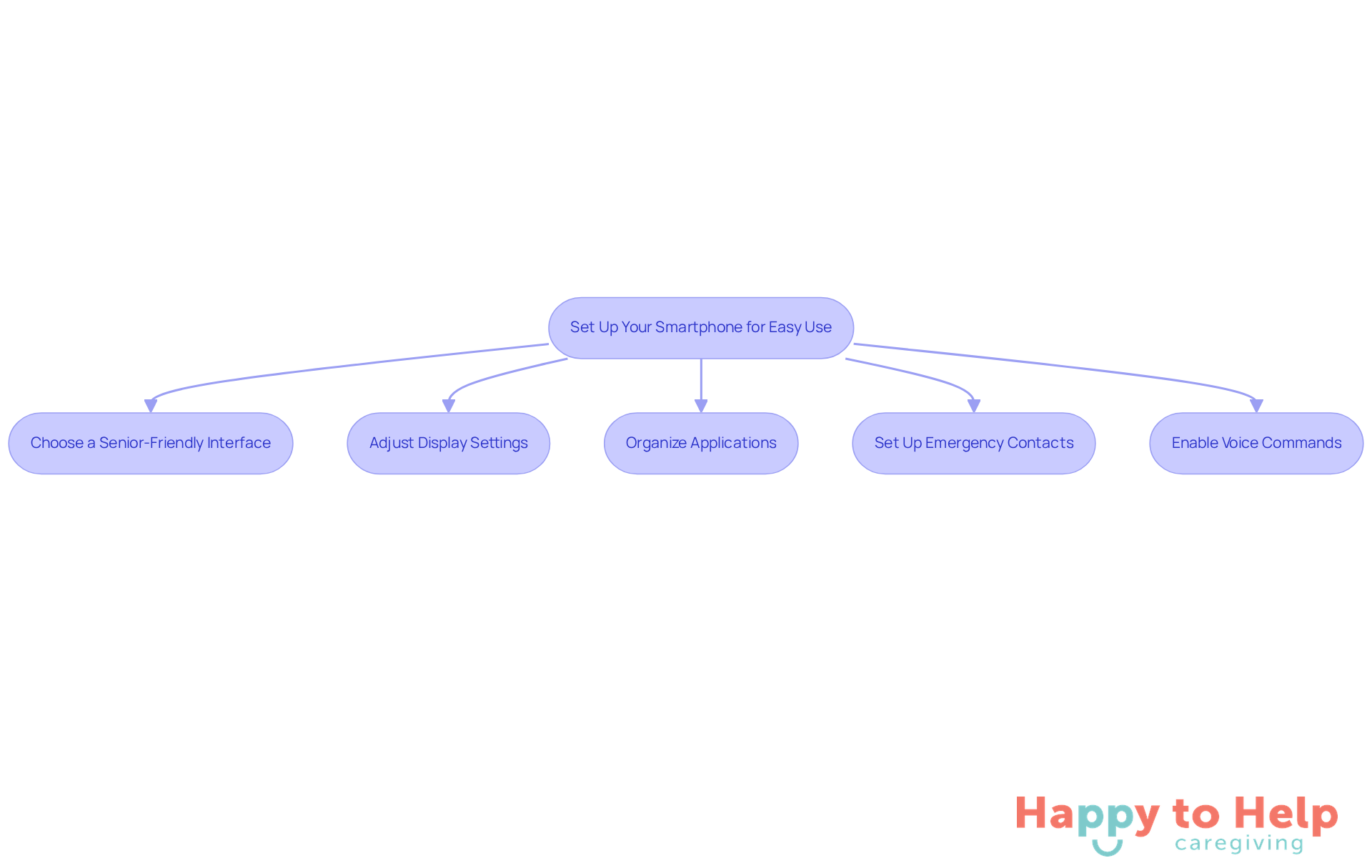
Set Up Your Smartphone for Easy Use
To set up your smartphone for optimal use, it's important to understand how to use a smart phone for seniors and address the challenges they face with technology. With 87.21% of older adults now owning a smartphone, understanding how to use a smart phone for seniors can be daunting. Here are some practical solutions to enhance their experience:
-
Choose a Senior-Friendly Interface: Many smartphones offer simplified home screen options, such as 'Easy Mode' or 'Senior Mode.' These interfaces are designed to illustrate how to use a smart phone for seniors by reducing clutter and making navigation more intuitive for older users.
-
Adjust Display Settings: Enhance visibility by increasing text size and contrast. Navigate to Settings > Display > Font Size to adjust according to your preference. Accessibility experts provide guidance on how to use a smart phone for seniors by recommending high-contrast themes to improve readability, especially for those with visual impairments.
-
Organize Applications: For easier access, place frequently used programs on the home screen. Consider creating folders for similar applications, such as grouping all communication tools together, which can streamline usage.
-
Set Up Emergency Contacts: Add important contacts to your favorites for quick access. Many smartphones allow you to designate an emergency contact, ensuring that help is just a tap away in critical situations.
-
Enable Voice Commands: Activate voice assistants like Siri or Google Assistant for hands-free navigation. This feature is particularly beneficial for seniors, as it demonstrates how to use a smart phone for seniors by allowing them to make calls or send messages without needing to type, thus enhancing their overall smartphone experience.
Explore Useful Apps for Daily Life
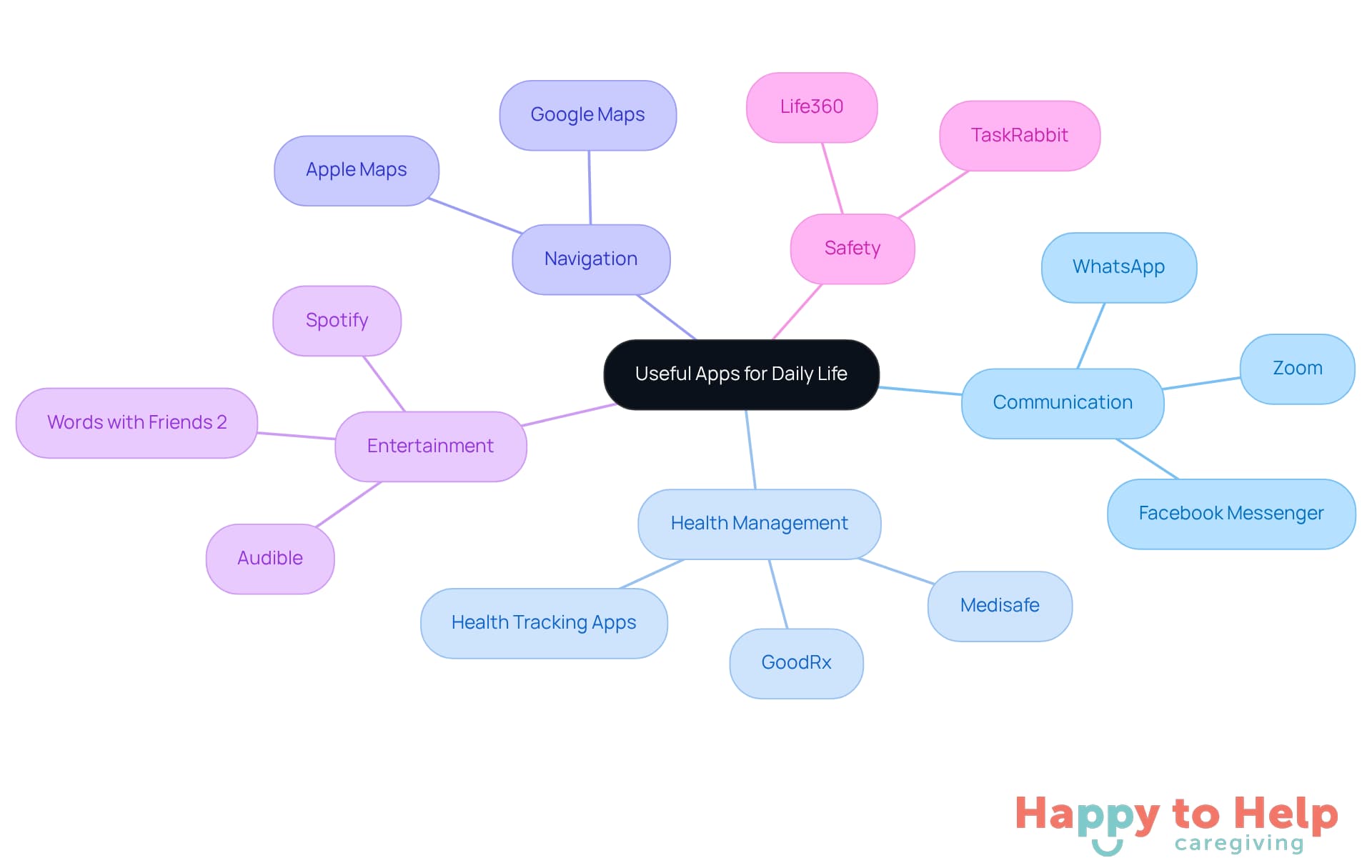
Managing daily tasks can be challenging, especially when it comes to understanding how to use a smart phone for seniors to stay connected, organized, and entertained. Caregivers often face the problem of juggling multiple responsibilities, which can lead to stress and inefficiency. Fortunately, there are apps that demonstrate how to use a smart phone for seniors, helping to streamline these tasks and enhance daily life.
-
Communication: Staying connected with family and friends is crucial. Apps like WhatsApp or Zoom allow for seamless calls and video chats, making it easier to maintain relationships.
-
Health Management: Keeping track of medications can be daunting. Medisafe is an excellent tool that sends reminders when it's time to take your pills, ensuring you never miss a dose.
-
Navigation: Getting lost can add unnecessary stress. Google Maps is invaluable for directions and finding local services, plus you can save favorite locations for quick access.
-
Entertainment: Finding time to unwind is essential. To enjoy your favorite content on the go, it's important to understand how to use a smart phone for seniors, including downloading Audible for audiobooks or Spotify for music streaming.
-
Safety: Keeping track of loved ones is a priority. Life360 is a family locator app that provides peace of mind by helping you monitor their whereabouts.
Take your time to explore these applications. Start with one or two that interest you, and gradually add more as you become comfortable.
Access Support and Learning Resources
To address the challenges seniors face in learning how to use a smart phone for seniors, it’s essential to provide them with effective resources. Many older adults struggle with technology, which can lead to feelings of frustration and isolation. Fortunately, there are several valuable resources available to help them learn how to use a smart phone for seniors and enhance their smartphone skills with confidence.
-
Online Tutorials: Websites like Senior Planet and AARP offer free online classes specifically designed for seniors on how to use a smart phone for seniors, focusing on smartphone usage and various apps. These interactive sessions foster a supportive learning atmosphere, with approximately 50 classes scheduled each week by Senior Planet, including sessions on how to use a smart phone for seniors, ensuring ample opportunities for participation.
-
YouTube Videos: YouTube hosts numerous channels dedicated to mobile device tutorials, providing step-by-step instructions tailored for older adults. These visual aids significantly enhance understanding and retention, making learning more accessible. As Tom Kamber, vice president of Older Adults Technology Services, notes, "The live experience is very compelling to people," highlighting the effectiveness of interactive learning.
-
Community Workshops: Local community centers and libraries often provide practical sessions on how to use a smart phone for seniors. Participation in these workshops not only imparts essential skills but also encourages social interaction, which is beneficial for overall well-being. With 77% of older individuals owning some form of cell phone, learning how to use a smart phone for seniors is crucial for helping them navigate their devices effectively.
-
Family Support: Involving family members can be incredibly beneficial. They can assist with device features and establish regular check-ins to provide ongoing support.
-
User Manuals: Most smartphones come with user manuals that are accessible online. These manuals serve as a valuable resource for troubleshooting and discovering new features, empowering older adults to navigate their devices with greater confidence.
By leveraging these resources, seniors can gain knowledge on how to use a smart phone for seniors and feel more confident in using their devices effectively.

Making the Right Choice
Understanding how to effectively use a smartphone poses a significant challenge for many seniors, often hindering their independence and connectivity. This lack of familiarity can lead to feelings of isolation and frustration, making it essential to address these issues head-on.
To empower older adults in their technology journey, this guide has illuminated the essential components of smartphones, provided practical setup tips, recommended useful apps, and highlighted valuable resources. Key points covered include:
- The importance of familiarizing oneself with the smartphone's touchscreen interface
- Organizing apps for easy access
- Utilizing voice commands for hands-free operation
- Setting up emergency contacts
- Adjusting display settings to cater to individual needs
Exploring applications that facilitate communication, health management, navigation, entertainment, and safety can profoundly enrich the user experience. By leveraging available resources, such as online tutorials, community workshops, and family support, seniors can cultivate confidence in their smartphone skills.
Ultimately, learning to use a smartphone is not just about mastering technology; it’s about enhancing quality of life and staying connected with loved ones. Embracing these tools opens up a world of possibilities, empowering older adults to navigate their lives with greater ease and security.
https://iframe.tely.ai/cta/eyJhcnRpY2xlX2lkIjogIjY5M2Y1MGE2Njk1NDdlMzRlNWE0ZWU3NCIsICJjb21wYW55X2lkIjogIjY4ZWU1ZGNhNzMxNzYyNTU3ZjNjOTVjMSIsICJpbmRleCI6IG51bGwsICJ0eXBlIjogImFydGljbGUifQ==Frequently Asked Questions
What is the primary interface used in smartphones?
Smartphones rely on a touchscreen interface, which requires users to tap, swipe, and pinch to navigate.
What is the purpose of the home screen on a smartphone?
The home screen serves as the main dashboard, providing access to apps and featuring icons for frequently used applications to simplify navigation.
What are apps and what do they do?
Apps, short for applications, are programs that perform specific tasks, such as messaging, calling, or browsing the internet.
How can I customize my smartphone settings?
The settings section allows you to adjust your phone's features, including sound, display, and accessibility options, to tailor the device to your needs.
What should seniors do to learn how to use a smartphone?
Seniors should take time to explore the smartphone features, tap on different icons, and experiment, as making mistakes is part of the learning process.
List of Sources
- Understand Smartphone Basics
- Share of those 65 and older who are tech users has grown in the past decade (https://pewresearch.org/short-reads/2022/01/13/share-of-those-65-and-older-who-are-tech-users-has-grown-in-the-past-decade)
- Senior Technology Statistics: Key Facts (https://californiamobility.com/21-senior-technology-statistics)
- Older Americans Are Leveraging More Technology (https://aarp.org/pri/topics/technology/internet-media-devices/2025-technology-trends-older-adults)
- Why you should embrace new technology as you age (https://washingtonpost.com/wellness/2025/11/19/phone-computer-technology-use-cognition-benefit)
- The Rise of Tech-Savvy Seniors: How Older Adults are Adapting in 2025 (https://textmygov.com/news/tech-savvy-seniors)
- Set Up Your Smartphone for Easy Use
- Embracing Innovation: Why Senior Citizens Are Embracing Mobile Apps (https://gogovapps.com/blog/embracing-innovation-why-senior-citizens-are-embracing-mobile-apps)
- Seniors and Smartphone Usage | Navigating New Opportunities (https://sageage.com/blog/a-deep-dive-into-seniors-and-smartphone-usage)
- Resource (https://discoveryvillagechevychase.seniorlivingnearme.com/resources/the-best-senior-friendly-smartphones-simple-intuitive-and-reliable)
- Senior Cell Phones Statistics 2025 | Retirement Living (https://retirementliving.com/cell-phones-for-seniors/cell-phones-for-seniors-statistics)
- Embracing Technology: Surging Smartphone Adoption Among the Elderly | QliqSOFT (https://qliqsoft.com/blog/embracing-technology-surging-smartphone-adoption-among-the-elderly)
- Explore Useful Apps for Daily Life
- Medicare Guidance Simplified | Chapter (https://askchapter.org/magazine/security-scam-tech-tips/tech-tips/best-senior-apps-easy-to-use-apps-for-older-adults)
- Apps for Seniors: 22 Must-Have Tools to Improve Life in 2025 (https://storypoint.com/resources/health-wellness/apps-for-seniors)
- 8 Best Senior Apps That Make Daily Life Easier in 2025 (https://arhomecare.com/8-best-senior-apps-that-make-daily-life-easier-in-2025)
- Our 2025 List of Apps for Seniors and the Elderly (https://seniorliving.org/cell-phone/apps)
- (https://seniorcarefinder.com/resource/top-10-apps-for-older-adults)
- Access Support and Learning Resources
- Older Adults and Technology Use (https://pewresearch.org/internet/2014/04/03/older-adults-and-technology-use)
- AARP Joins With Nonprofit to Teach Tech to Older Adults (https://aarp.org/about-aarp/oats-senior-planet)
- Senior Planet, AARP’s VCC Offer Free Classes on Smartphones (https://aarp.org/personal-technology/senior-planet-and-aarp-online-classes)
- Older Americans Are Leveraging More Technology (https://aarp.org/pri/topics/technology/internet-media-devices/2025-technology-trends-older-adults)
- Continuing Education for Seniors: Facts and Statistics (https://theseniorlist.com/research/seniors-higher-education-study)