
For families in our service areas
For families in our service areas, this guide explains caregiving and how non-medical in-home caregiving can support care planning in East Idaho, Treasure Valley & Magic Valley, Northern Wasatch, North Central West Virginia, and Northeast Ohio.
Understanding Digitize Memories for Your Family
Preserving family memories is increasingly vital as physical media deteriorates over time, putting invaluable moments at risk. Caregivers face the challenge of ensuring these cherished memories don’t fade away. The implications are significant: without action, families may lose irreplaceable photographs, videos, and memorabilia that tell their unique stories.
So, how can caregivers effectively gather, organize, and convert these memories into a lasting digital legacy? This guide provides a practical roadmap to help you digitize your family’s treasures, ensuring they endure for future generations. By following these actionable steps, you can create a digital archive that safeguards your family’s history.
Gather and Organize Your Media
Use english for answers
Problem: The Challenge of Preserving Family Memories
Many caregivers face the daunting task of preserving family memories through digitization. Without proper attention, cherished photographs, videos, and memorabilia can deteriorate over time, leading to the loss of invaluable moments.
Agitate: The Implications of Neglect
Neglecting this task can result in the fading of family history, as physical media deteriorates. Items stored in attics, basements, and closets may be forgotten, leaving precious memories at risk. Family memories are the threads that weave together the tapestry of our lives, making it essential to approach this task with care and intention.
Solution: Steps to Digitize and Preserve
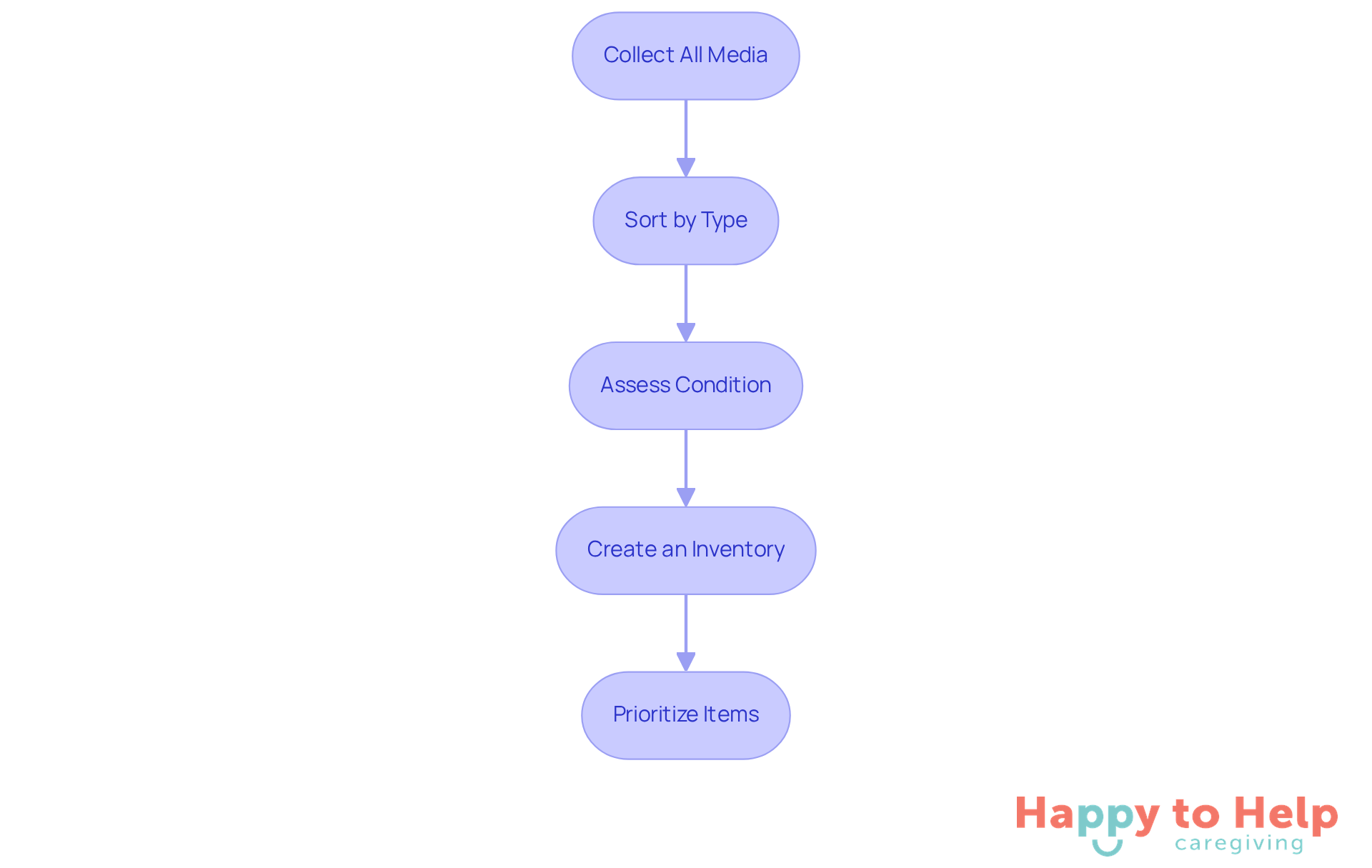
- Collect All Media: Start by gathering all physical media intended for digitization, including photographs, slides, VHS tapes, audio recordings, and other memorabilia.
- Sort by Type: After gathering, classify the objects into groups such as photos, videos, and documents. This organization simplifies the digitization process and makes it easier to manage each type of media.
- Assess Condition: Carefully evaluate the state of each object. Identify any fragile or damaged items that may require special handling during the digital conversion process to prevent further deterioration.
- Create an Inventory: Compile a comprehensive list of all products, noting their condition and any relevant details for future reference. This inventory will guide you through the digitization process and help track progress.
- Prioritize Items: Determine which items are most crucial to digitize first, focusing on those in poor condition or with significant sentimental value. Prioritizing ensures that the most cherished memories are preserved promptly.
Digital transformation is not just a technical task; it is an ongoing journey to digitize memories for future generations and an act of love. By investing time in this process, you are safeguarding your family's legacy.
Choose the Right Digitization Kit
-
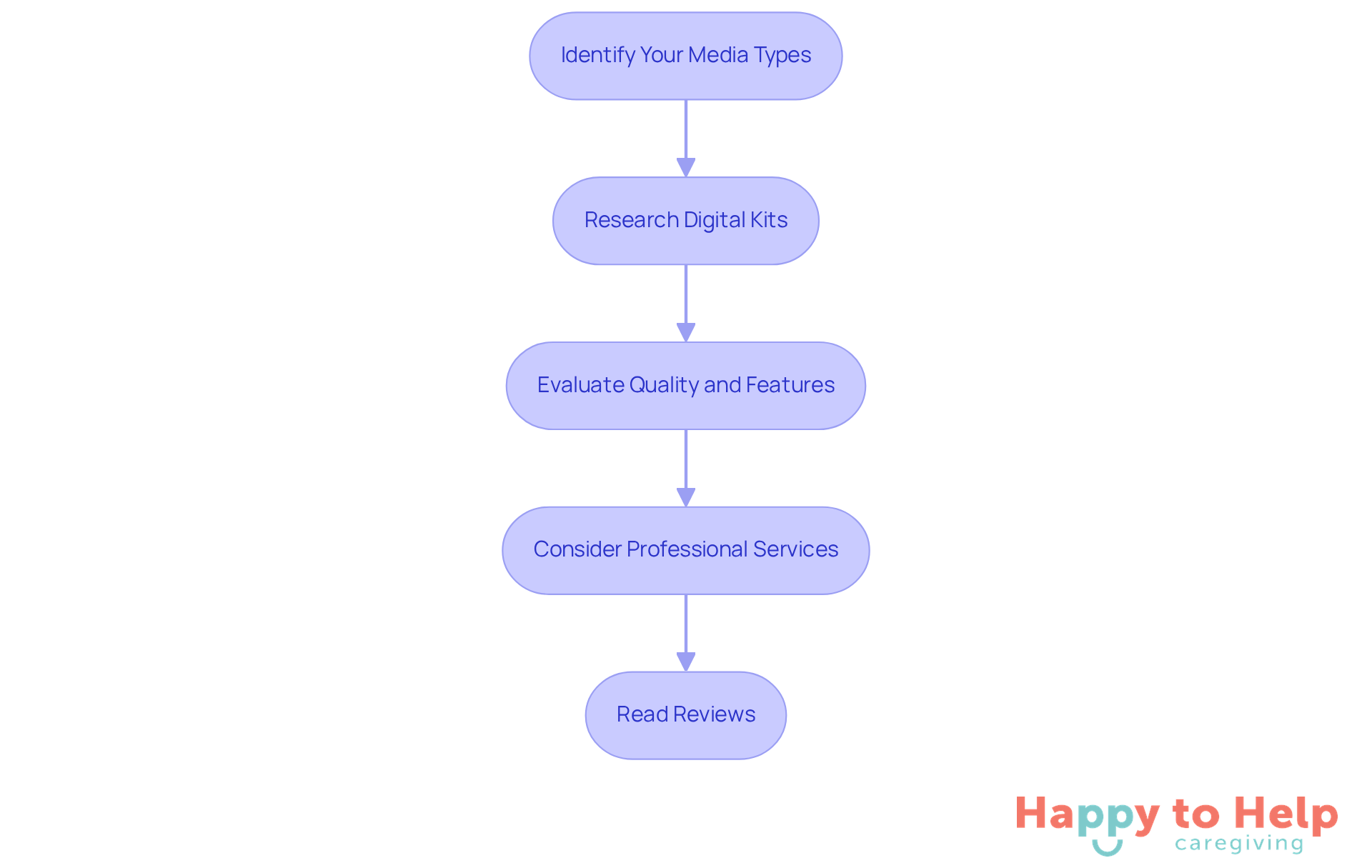
Identify Your Media Types: Caregivers often struggle with preserving precious memories stored in various media formats, such as photos, videos, or slides. Each format may require specific equipment to achieve the best outcomes in converting to digital. Cataloging these media types is the first step in addressing this challenge.
-
Research Digital Kits: Once you’ve identified your media, seek out digital kits tailored to your needs. For photographs, flatbed scanners or portable photo scanners are ideal. If you’re dealing with video content, VHS to digital converters are essential. Consider options like Legacybox, which provides easy-to-use kits for different media types, ensuring a straightforward conversion process.
-
Evaluate the quality and features, since quality matters when you digitize memories. Assess the resolution and quality specifications of the kits. Opt for higher DPI (dots per inch) settings for photos to ensure clarity, and ensure that video converters support high-definition output for optimal viewing. For instance, iMemories charges $29.99 per tape and enhances clarity through their McKenzie™ AI technology, improving the quality of digitized files.
-
Consider Professional Services: If you have a significant collection or items that are damaged, expert conversion services may be the best option. Investigate local or online providers specializing in media conversion, such as iMemories, which has a turnaround time of approximately 3 weeks for digitizing home movies and photos. This can be especially advantageous for caregivers needing prompt access to digitize memories.
-
Read Reviews: Before making a purchase or selecting a service, consult customer reviews to evaluate the quality and reliability of the product or service. This feedback can provide valuable insights into the effectiveness of the digital kit or service you are considering. Additionally, consider secure storage options for your memories as many services offer cloud storage to help you digitize memories and protect against loss or damage.
Digitize Your Media with Professional Help
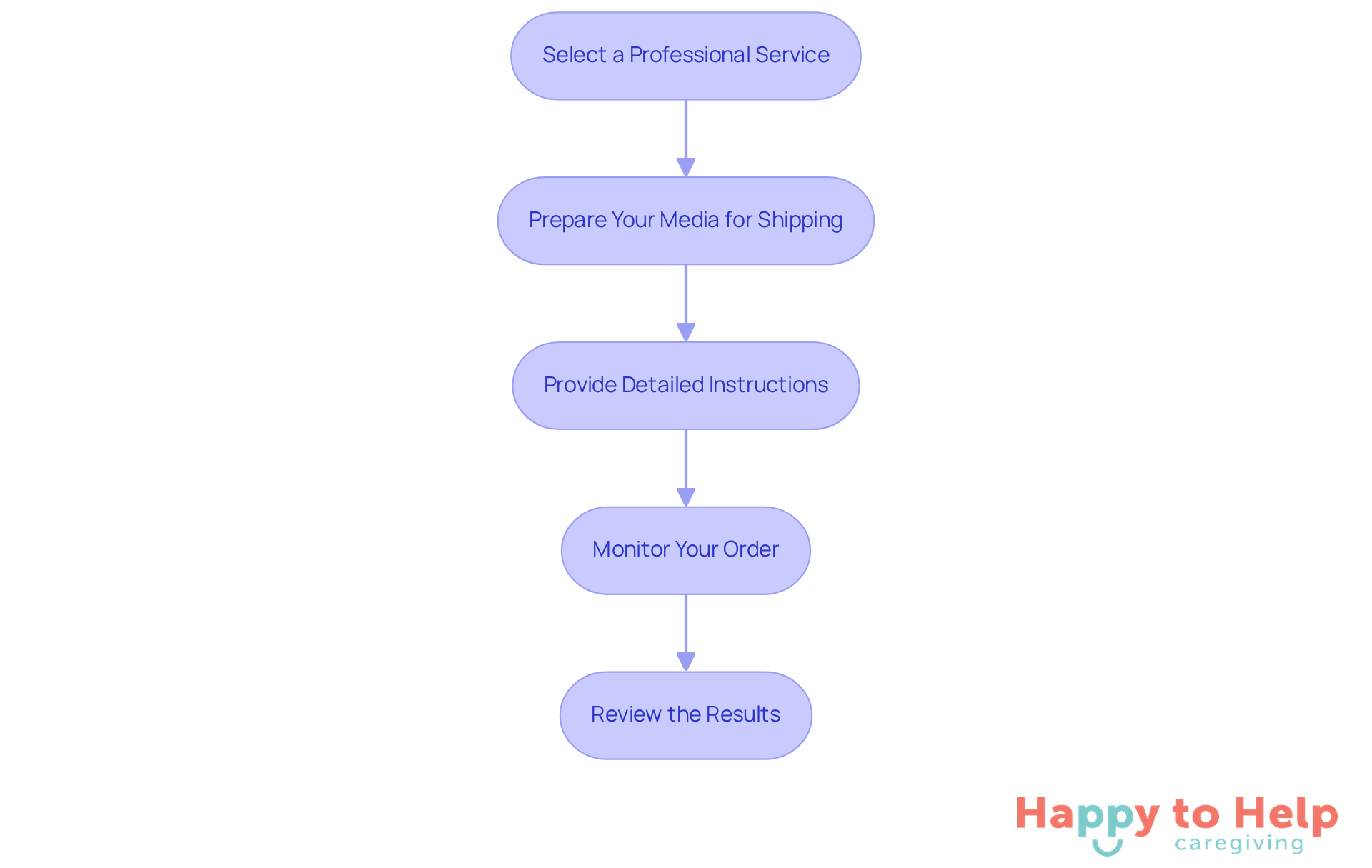
Select a Professional Service: Choosing the right digitization service can be daunting. With so many options available, it’s crucial to research and select a reputable company that specializes in your type of media. Check reviews and ratings to ensure you’re making an informed decision.
Prepare Your Media for Shipping: If you opt for a mail-in service, the safety of your belongings is paramount. Carefully package your items to prevent damage during transit. Use protective materials like bubble wrap and sturdy boxes to safeguard your media.
Provide Detailed Instructions: Clear communication is key when sending your media. Include specific guidelines on how you want the materials digitized, such as preferred file formats and organization. This ensures that your expectations are met.
Monitor Your Order: After dispatching your products, it’s important to keep track of your order. Utilize the service’s tracking system for peace of mind as you await the return of your memories that have been digitized.
Review the Results: Once you receive your digitized files, take the time to review them for quality. Ensure that all items were digitized according to your specifications and that the quality meets your expectations.
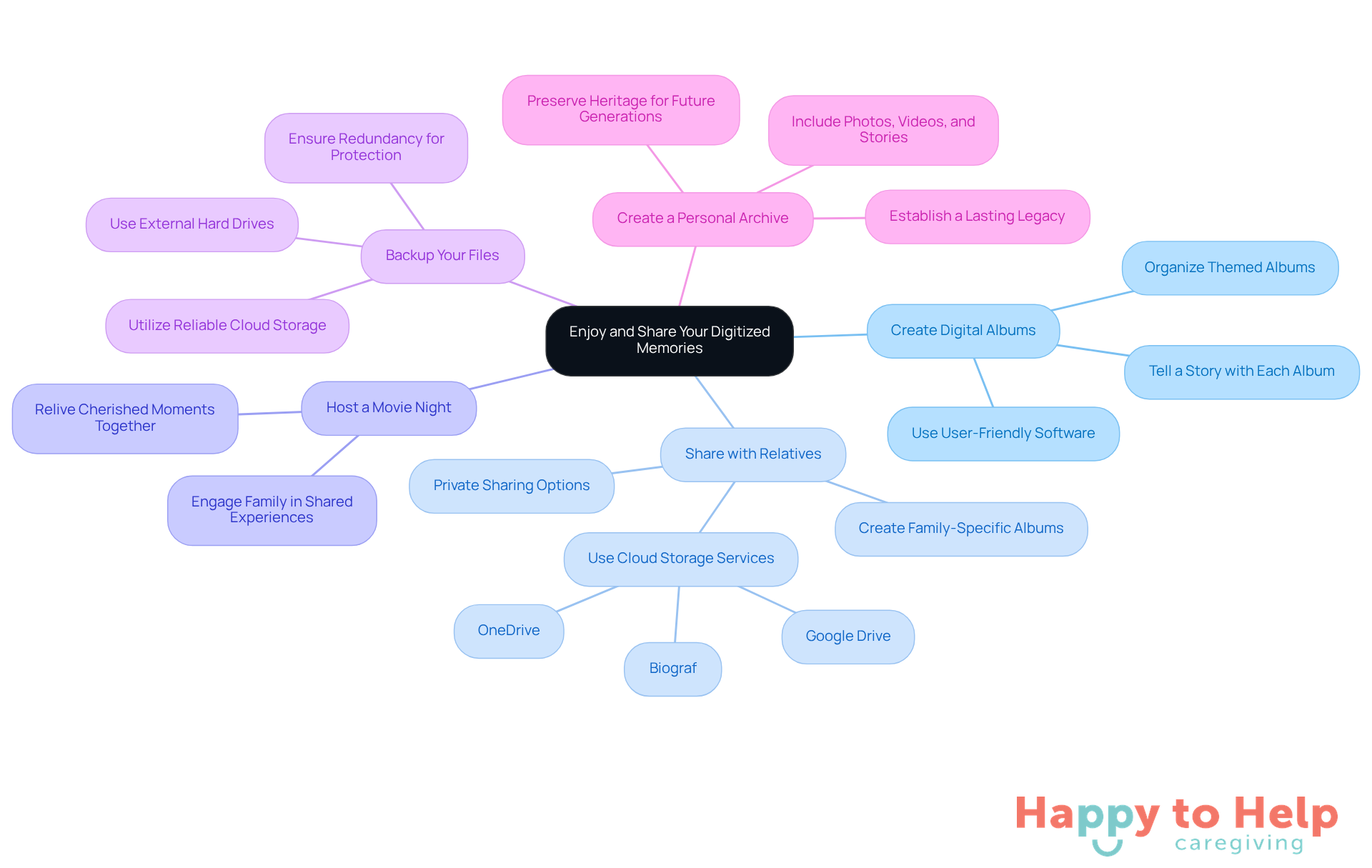
Enjoy and Share Your Digitized Memories
Create Digital Albums: Organizing your digitized photos and videos into themed digital albums is essential. Many households digitize memories, producing an average of 10 digital albums after converting their experiences, which emphasizes the need for structured sharing. Use user-friendly software or online platforms that facilitate easy access and sharing, ensuring that each album tells a story.
Share with Relatives: Cloud storage services like Google Drive, OneDrive, or pCloud enable you to securely share your digitized memories with relatives. These platforms enable private sharing, creating family-specific albums that keep your moments safe from social media clutter. Successful examples of households using platforms like Biograf highlight the emotional impact of sharing memories privately, reinforcing the idea that we can digitize memories to share with those who matter most.
Host a Movie Night: Organizing a movie night to digitize memories with your videos is a great way to relive cherished moments together. This engaging activity strengthens family bonds through shared experiences.
Backup Your Files: Safeguarding your digitized memories is crucial. Back them up in various places, such as external hard drives and reliable cloud storage options. This redundancy ensures that your precious memories are protected against loss.
Create a Personal Archive: Establishing a comprehensive digital archive that includes not just photos and videos, but also stories and important documents, can serve as a lasting legacy. This archive preserves your heritage for future generations to cherish.
Therapists emphasize that sharing experiences promotes connection and reinforces relationships, making it vital for overall well-being. Notably, a staggering 96% of printed photos remain unseen in most families, highlighting the necessity to digitize memories and share them.
Moving Forward with Digitize Memories for Your Family
Digitizing family memories presents a significant challenge: how to preserve cherished moments for future generations. Without this effort, families risk losing their legacies and histories, which can lead to a disconnect from their roots. This emotional burden can weigh heavily on caregivers who wish to maintain these connections.
To address this issue, families can adopt a comprehensive four-step approach to digitizing their memories:
- Gather and organize various media formats.
- Assess the condition of items, prioritize those that hold the most significance, and choose suitable digitization kits or professional services.
- Safeguard memories and enhance the joy of sharing them through digital albums and cloud storage.
- Engage in family activities centered around these digitized memories to reinforce the idea that these moments should be accessible and celebrated together.
By taking action today, families not only preserve their history but also create a lasting legacy that can be cherished for years to come. This journey of digitizing memories transcends mere conversion; it fosters emotional bonds and enriches family relationships, ensuring that the tapestry of family history remains vibrant and alive.
https://iframe.tely.ai/cta/eyJhcnRpY2xlX2lkIjogIjY5NDFmMzU2MDNjMTJkY2ZiNTk2MGFlNCIsICJjb21wYW55X2lkIjogIjY4ZWU1ZGNhNzMxNzYyNTU3ZjNjOTVjMSIsICJpbmRleCI6IG51bGwsICJ0eXBlIjogImFydGljbGUifQ==Frequently Asked Questions
What is the main challenge caregivers face regarding family memories?
Caregivers often struggle with preserving family memories through digitization, as physical media like photographs and videos can deteriorate over time, risking the loss of invaluable moments.
What are the consequences of neglecting the preservation of family memories?
Neglecting this task can lead to the fading of family history, as items stored away may be forgotten and suffer deterioration, putting precious memories at risk.
What initial step should be taken to digitize family media?
The first step is to gather all physical media intended for digitization, including photographs, slides, VHS tapes, audio recordings, and other memorabilia.
How should the gathered media be organized?
After gathering, the media should be sorted by type into groups such as photos, videos, and documents to simplify the digitization process.
Why is it important to assess the condition of each media item?
Assessing the condition is crucial to identify fragile or damaged items that may require special handling during the digital conversion process to prevent further deterioration.
What is the purpose of creating an inventory of the media items?
Creating an inventory helps compile a comprehensive list of all items, noting their condition and relevant details, which guides the digitization process and helps track progress.
How can one prioritize which items to digitize first?
Prioritize items by determining which are most crucial to digitize first, focusing on those in poor condition or with significant sentimental value to ensure cherished memories are preserved promptly.
What is the overall significance of digitizing family memories?
Digitizing family memories is an ongoing journey that not only preserves memories for future generations but also acts as a loving investment in safeguarding the family's legacy.
List of Sources
- Gather and Organize Your Media
- Your Old Family Photos Are Fading — Here’s How to Save Them by Digitizing at Home (https://creators.yahoo.com/lifestyle/story/your-old-family-photos-are-fading--heres-how-to-save-them-by-digitizing-at-home-190309935.html)
- How You Can Preserve Family Memories for Generations to Come (https://nbcdfw.com/news/consumer-reports/how-you-can-preserve-family-memories-for-generations-to-come/2917742)
- 7 Tips to Digitize and Preserve Family Memories (https://remento.co/journal/7-tips-to-digitize-and-preserve-family-memories)
- Choose the Right Digitization Kit
- 2024 Guide: 7 Products and Services to Help You Digitize Your Old Photos and Videos (https://remento.co/journal/2024-guide-7-products-and-services-to-help-you-digitize-your-old-photos-and-videos)
- Legacybox® — Digitize Home Movies, Photos, Slides & More (https://legacybox.com/?srsltid=AfmBOorFA6v6xtduEtRjGAm4wnPfU8\_Dt1uCMjGKFmFaQdtzLZGgNefu)
- Digitize Your Home Videos, Film Reels, & Photos | iMemories (https://imemories.com/kit?srsltid=AfmBOooGO6K3zkzo8jZmgDz6u6e6Q1\_LAWbOn0nK9l7pgQmf-KpwdXjq)
- 9 Best Companies to Digitize Your Home Movies [2025 Review] | Capture Media Digitization Services (https://capture.com/blogs/video/best-company-to-digitize-home-movies)
- Digitize Your Media with Professional Help
- 2024 Guide: 7 Products and Services to Help You Digitize Your Old Photos and Videos (https://remento.co/journal/2024-guide-7-products-and-services-to-help-you-digitize-your-old-photos-and-videos)
- MyHeritage and ScanCafe Partner to Digitize and Preserve Family Memories - MyHeritage Blog (https://blog.myheritage.com/2025/06/myheritage-and-scancafe-partner-to-digitize-and-preserve-family-memories)
- Capture | Trusted Media Digitization Services (https://yesvideo.com/blogs/resources/best-digitizing-services-2024)
- 40+ Digital Transformation Statistics You Need to Know in 2025 (https://cflowapps.com/digital-transformation-statistics)
- MyHeritage and ScanCafe Partner to Digitize and Preserve Family Memories (https://businesswire.com/news/home/20250526332767/en/MyHeritage-and-ScanCafe-Partner-to-Digitize-and-Preserve-Family-Memories)
- Enjoy and Share Your Digitized Memories
- Best Cloud Storage for Family Photos (https://scanmyphotos.com/blog/2025/02/best-cloud-storage-for-family-photos.html?srsltid=AfmBOooohBdBCS0CrZ1GIljby8Eu9EM81l-b6d9Ac8XTWqv8b83KtcBi)
- The Complete Guide to Creating a Digital Family Album in Minutes (https://biograf.ai/family-connections/digital-family-album-post-one)
- The Best Cloud Storage and File-Sharing Services We've Tested for 2026 (https://pcmag.com/picks/the-best-cloud-storage-and-file-sharing-services)
- Best Family Cloud Storage in 2025 (https://cloudwards.net/best-cloud-storage-for-families)
- How to create a stunning digital family album: 10 essential tips (https://kinnect.club/blog/create-digital-family-album)