
For families in our service areas
For families in our service areas, this guide explains caregiving and how non-medical in-home caregiving can support care planning in East Idaho, Treasure Valley & Magic Valley, Northern Wasatch, North Central West Virginia, and Northeast Ohio.
Why Comparing Simple Computers Matters
Navigating the digital world can often feel daunting for seniors. Complex technology and intricate interfaces frequently lead to frustration and isolation. This challenge not only affects their ability to connect with loved ones but also limits their access to valuable information.
Simple computers designed specifically for older adults offer a lifeline. They empower seniors to stay connected and informed, bridging the gap created by complicated technology. However, with a plethora of options available, caregivers face the challenge of identifying the best fit that balances usability, accessibility, and functionality.
This article delves into the key features, pros and cons of various simple computer models, and essential considerations for choosing the right device. By understanding these factors, caregivers can enhance the digital experience for seniors, ensuring they remain engaged and connected in an increasingly digital world.
Overview of Simple Computers for Seniors
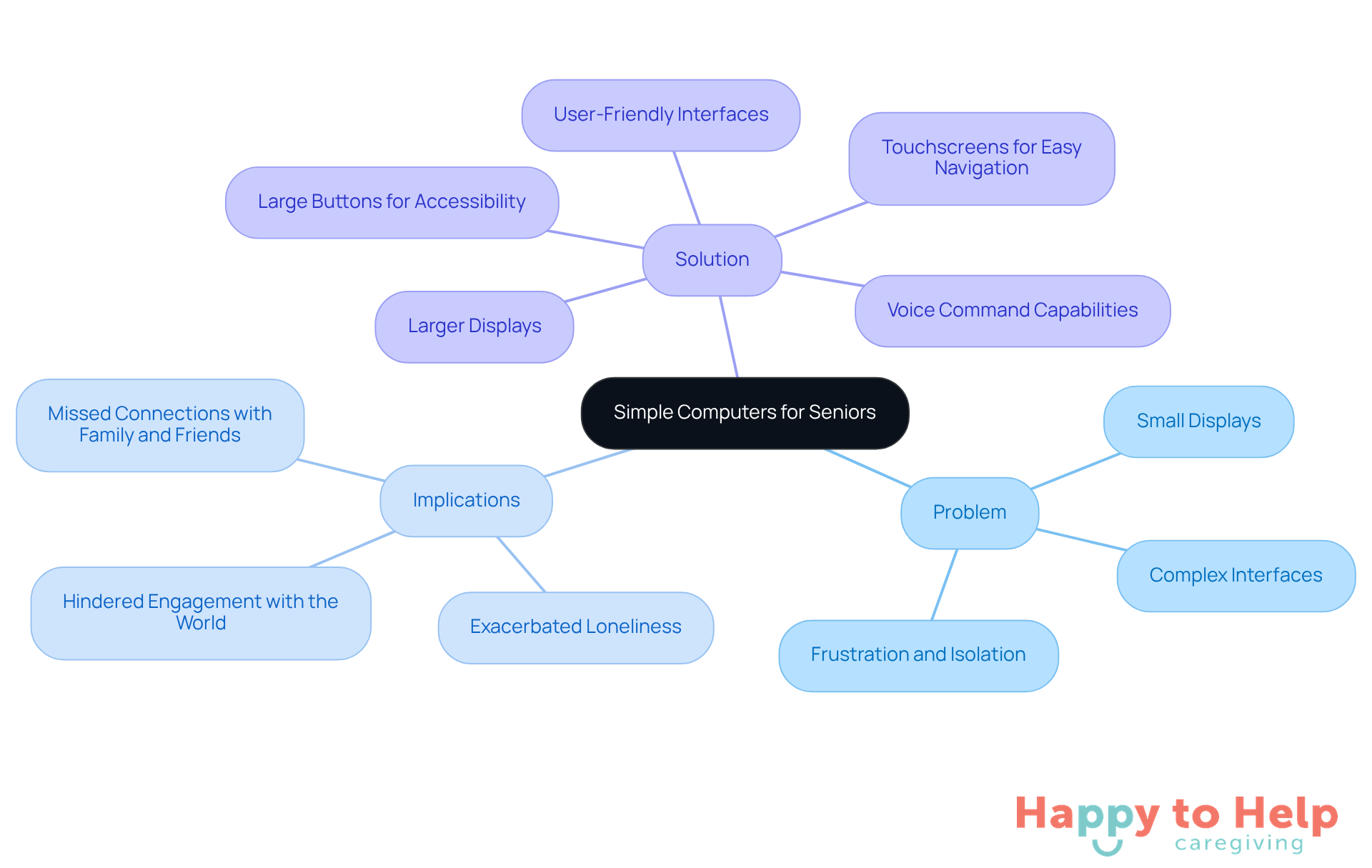
Problem: Many older individuals struggle with technology due to complex interfaces and small displays. This can lead to frustration and a sense of isolation, as they may find it difficult to communicate or access information online.
Agitate: The implications of this challenge are significant. Without user-friendly devices, elderly adults may miss out on vital connections with family and friends, as well as entertainment and information that can enrich their lives. The digital divide can exacerbate feelings of loneliness and hinder their ability to engage with the world around them.
Fortunately, a simple computer for seniors designed specifically for older individuals provides a way forward. These devices serve as a simple computer for seniors, featuring user-friendly interfaces, larger displays, and simplified functionalities tailored to meet their unique needs. Common features include:
- Touchscreens for easy navigation
- Large buttons for better accessibility
- Voice command capabilities for those with limited technical skills
The primary goal of these devices is to facilitate communication, entertainment, and basic internet usage without overwhelming users with complex features. Popular choices include tablets, Chromebooks, and all-in-one desktops, each providing varying levels of simplicity and functionality customized to older adults' preferences and abilities.
Key Features and Specifications of Top Models
Finding the right simple computer for seniors can be challenging. Many older adults struggle with technology, so a simple computer for seniors can help alleviate frustration and improve their confidence in using devices. This issue is compounded by the vast array of options available, making it difficult for caregivers to choose the best fit.
To address these challenges, here are several models that stand out due to their thoughtful design and specifications:
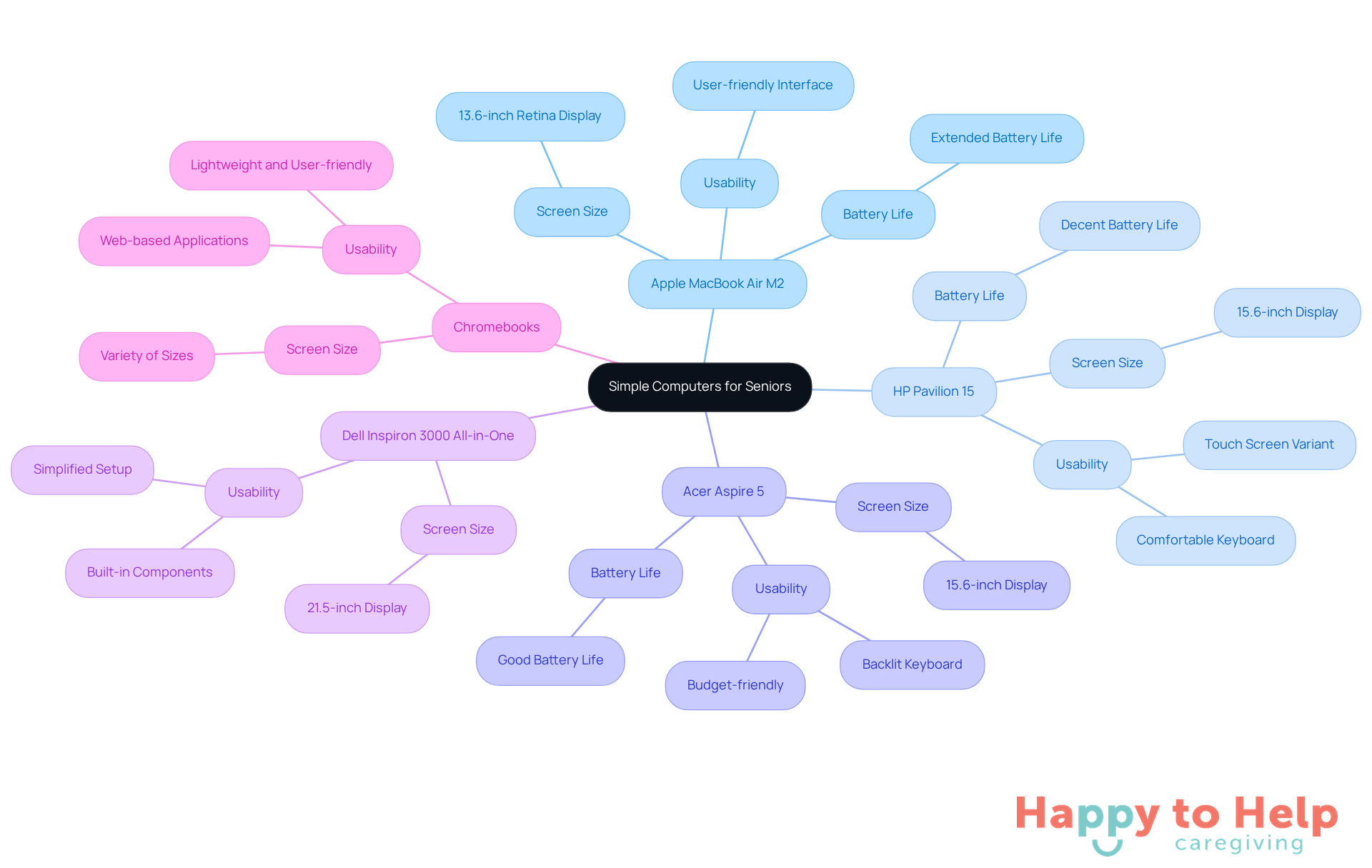
- Apple MacBook Air M2: Renowned for its lightweight design and user-friendly interface, it boasts a 13.6-inch Retina screen, extended battery life, and strong performance, making it perfect for seniors seeking a dependable laptop.
- HP Pavilion 15: This model features a larger 15.6-inch display, a comfortable keyboard, and a touch screen variant, which can be advantageous for those who favor tactile interaction.
- Acer Aspire 5: With a 15.6-inch display and a budget-friendly price, it provides a good balance of performance and usability, featuring a backlit keyboard and decent battery life.
- Dell Inspiron 3000 All-in-One: This desktop choice merges a spacious 21.5-inch display with built-in components, simplifying setup and reducing clutter, rendering it suitable for stationary use.
- Chromebooks: Lightweight and user-friendly, models such as the Acer Chromebook 14 provide simplicity with an emphasis on web-based applications, making them ideal for older adults who mainly use the internet for communication and entertainment.
Pros and Cons of Each Computer Option
It can be challenging to choose the right simple computer for seniors. Each option presents distinct advantages and disadvantages that caregivers should consider when selecting a simple computer for seniors to ensure usability and accessibility.
Apple MacBook Air M2:
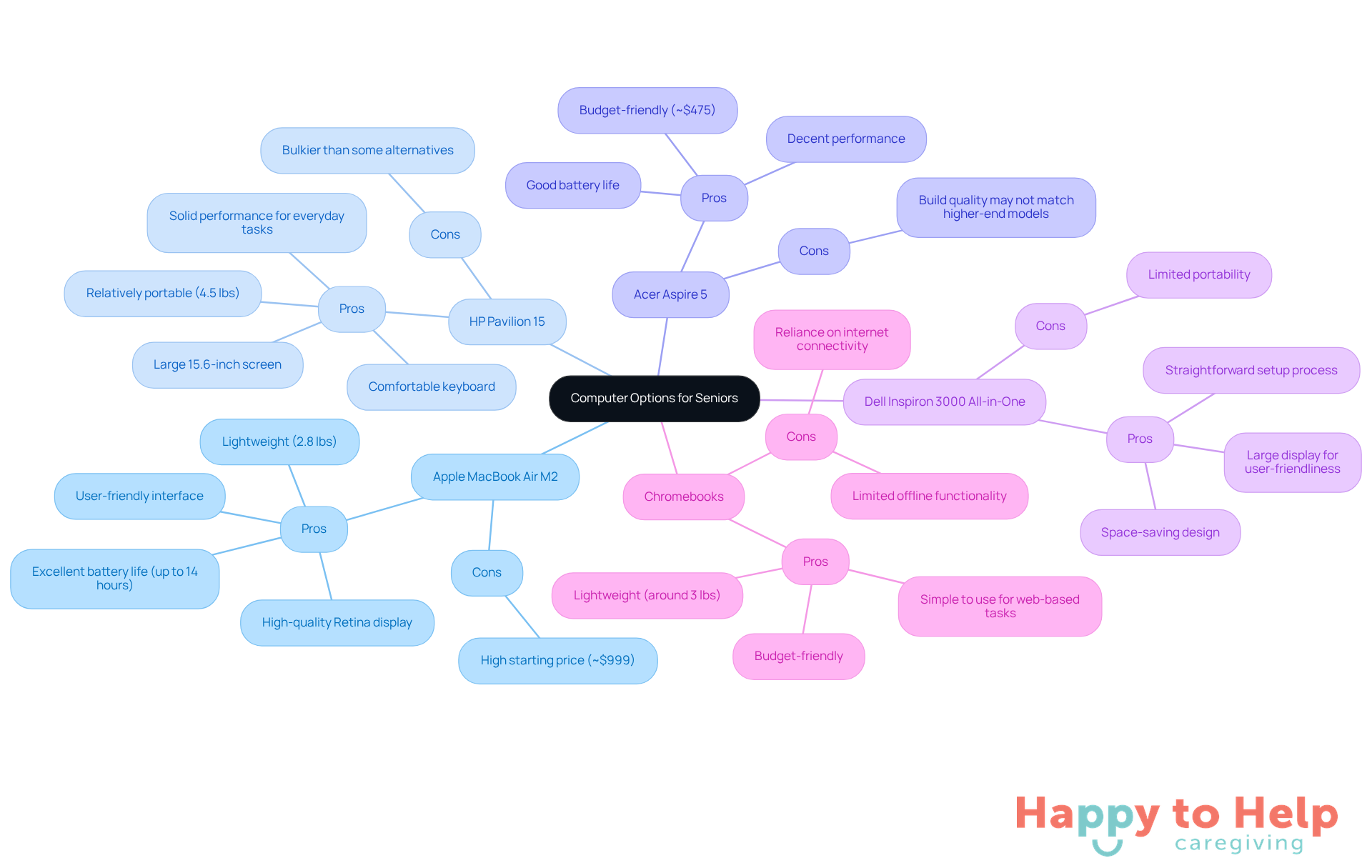
- Pros: Weighing in at approximately 2.8 pounds, it offers excellent battery life of up to 14 hours, a high-quality Retina display, and a user-friendly interface that simplifies navigation.
- Cons: However, its starting price of around $999 may be a barrier for some seniors, limiting accessibility.
HP Pavilion 15:
- Pros: This model features a large 15.6-inch screen that reduces eye strain, a comfortable keyboard, and solid performance for everyday tasks like web browsing and video calls. At about 4.5 pounds, it remains relatively portable for its size.
- Cons: Despite its touch screen feature, it is bulkier than some alternatives, which could be a concern for older adults who prioritize portability.
Acer Aspire 5:
- Pros: Starting at around $475, it is budget-friendly and provides decent performance and good battery life, making it suitable for basic tasks such as email and video calls.
- Cons: The build quality may not match that of higher-end models, potentially affecting longevity.
Dell Inspiron 3000 All-in-One:
- Pros: Its space-saving design and large display make it user-friendly, while the straightforward setup process is beneficial for seniors who may struggle with technology.
- Cons: Limited portability compared to laptops may restrict usage to a single location.
Chromebooks:
- Pros: These devices are budget-friendly and simple to use, ideal for web-based tasks, with many models weighing around 3 pounds for easy handling.
- Cons: However, their limited offline functionality and reliance on internet connectivity can be drawbacks for older adults who may not have reliable access to the web.
In 2025, the average weight of laptops favored by older adults tends to be around 4 to 5 pounds, striking a balance between portability and usability. Technology reviewers emphasize the importance of features such as large displays, comfortable keyboards, and intuitive operating systems to enhance the user experience for elderly users. As noted, "94% agree that the internet makes it much easier to find information today than in the past," highlighting the crucial role of technology in connecting older adults to essential resources.
Choosing the Right Computer for Senior Needs
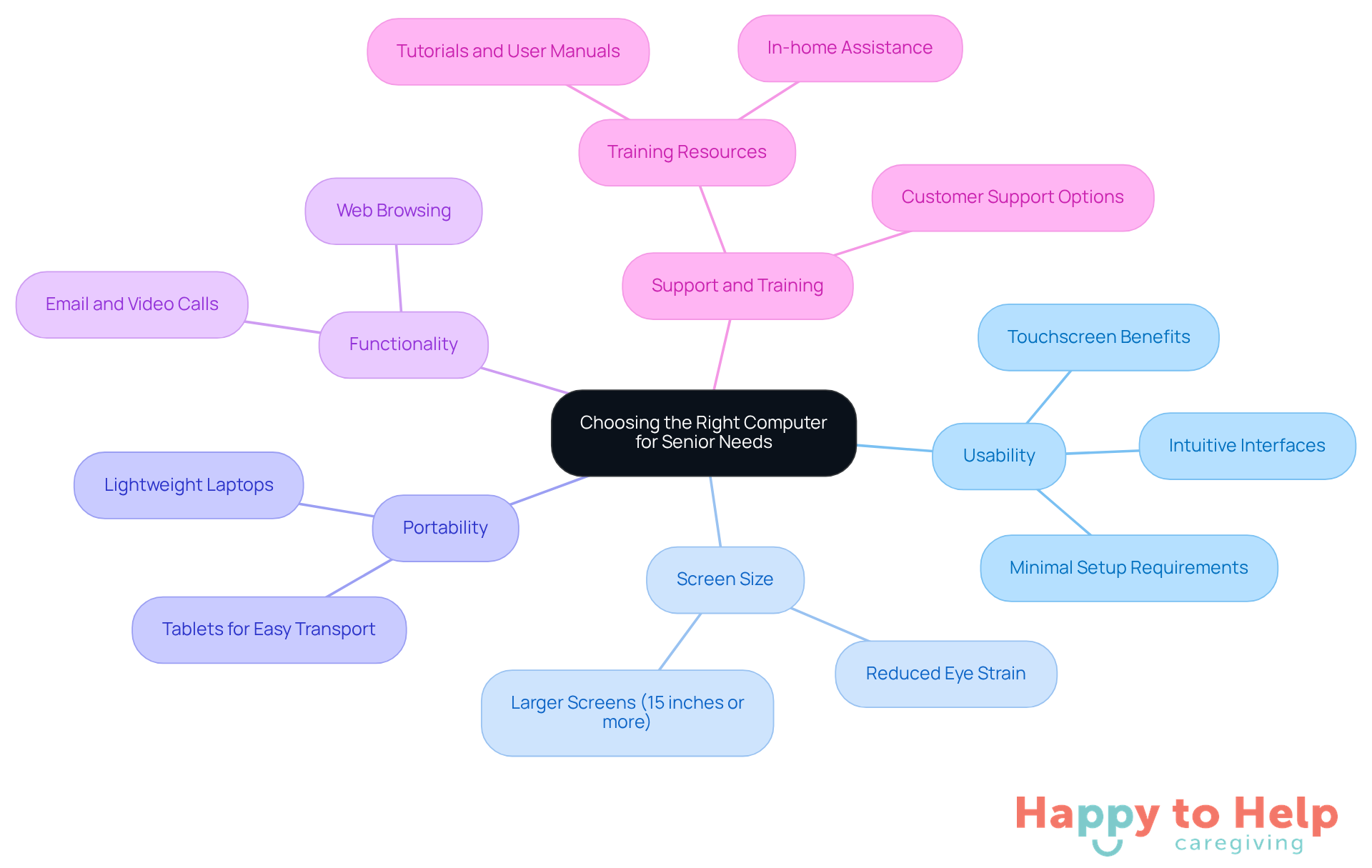
Selecting a simple computer for seniors can be challenging. Many seniors face difficulties with technology, which can lead to frustration and a lack of confidence. This is where careful consideration of their needs becomes essential.
-
Usability is a primary concern. A simple computer for seniors should have intuitive interfaces and minimal setup requirements, making it ideal. Touchscreens can be particularly beneficial for those using a simple computer for seniors, making navigation simpler.
-
Screen Size also plays a crucial role. Larger screens, ideally 15 inches or more, can significantly reduce eye strain and enhance the overall user experience.
-
Portability is another factor to consider. If the individual plans to move the computer around, lightweight laptops or tablets are preferable, ensuring ease of transport.
-
Functionality is key as well. Evaluate what the user will primarily utilize the simple computer for seniors for-be it email, video calls, or browsing-and select a model that excels in those areas.
-
Lastly, Support and Training are vital. Look for options that come with customer support or training resources. This can include tutorials, user manuals, or even in-home assistance if needed, helping seniors become comfortable with their new technology.
Key Takeaways for Caregivers
Selecting a simple computer for seniors addresses a significant problem: the technology gap that many older adults encounter. This gap can lead to feelings of isolation and hinder their ability to communicate, access information, and enjoy entertainment. By focusing on user-friendly designs and tailored features, caregivers can help bridge this divide, enriching the lives of seniors.
Key considerations for selecting the right device include:
- Usability
- Screen size
- Portability
- Functionality
Support and training are also crucial. For instance, comparing models like the lightweight and high-performance Apple MacBook Air M2 with the budget-friendly Acer Aspire 5 reveals unique advantages and disadvantages. Each option should be evaluated to ensure it meets the specific needs of older adults, facilitating a more accessible and enjoyable technology experience.
Ultimately, the right simple computer not only empowers seniors to stay connected with family and friends but also fosters independence and confidence in navigating the digital world. As technology evolves, prioritizing the needs of elderly users in product design and selection becomes essential. Caregivers and family members should actively explore available options, ensuring their loved ones can fully engage with the benefits of modern technology.
https://iframe.tely.ai/cta/eyJhcnRpY2xlX2lkIjogIjY5MjRmMjBkY2Q1NjY3YWUxYjQzNTcxNyIsICJjb21wYW55X2lkIjogIjY4ZWU1ZGNhNzMxNzYyNTU3ZjNjOTVjMSIsICJpbmRleCI6IG51bGwsICJ0eXBlIjogImFydGljbGUifQ==Frequently Asked Questions
What challenges do seniors face with technology?
Many older individuals struggle with technology due to complex interfaces and small displays, which can lead to frustration and a sense of isolation as they find it difficult to communicate or access information online.
What are the implications of seniors struggling with technology?
The implications are significant, as elderly adults may miss out on vital connections with family and friends, entertainment, and information that can enrich their lives. This digital divide can exacerbate feelings of loneliness and hinder their ability to engage with the world around them.
What features do simple computers for seniors typically have?
Simple computers for seniors often include touchscreens for easy navigation, large buttons for better accessibility, and voice command capabilities for those with limited technical skills.
What is the primary goal of simple computers designed for seniors?
The primary goal is to facilitate communication, entertainment, and basic internet usage without overwhelming users with complex features.
What types of devices are considered simple computers for seniors?
Popular choices for simple computers for seniors include tablets, Chromebooks, and all-in-one desktops, each offering varying levels of simplicity and functionality tailored to older adults' preferences and abilities.
List of Sources
- Overview of Simple Computers for Seniors
- The Rise of Tech-Savvy Seniors: How Older Adults are Adapting in 2025 (https://textmygov.com/news/tech-savvy-seniors)
- 5 Best Computers & Laptops for Seniors | Optimum (https://optimum.com/articles/internet/best-computers-for-seniors)
- Top Tech Gadgets Every Senior Should Have in 2025 (https://allseniors.org/articles/top-tech-gadgets-every-senior-should-have-in-2025)
- A Guide to Useful Technology for Older Adults in 2025 (https://seniorsbluebook.com/articles/a-guide-to-useful-technology-for-older-adults-in-2025)
- Easy-to-Use Tech Devices That Are Boosting Senior Wellness in 2025 - WorldHealth.net (https://worldhealth.net/news/easy-to-use-tech-devices-senior-wellness)
- Key Features and Specifications of Top Models
- The 5 Best Laptops for Seniors in 2025: Easy, Reliable, and Clear — SilverTech Support (https://silvertechsupport.co/blog/the-5-best-laptops-for-seniors-in-2025)
- Best Laptop for Seniors: 7 Options | Elder Care Alliance (https://eldercarealliance.org/blog/what-is-the-best-laptop-for-seniors)
- 5 Best Laptops For Seniors in 2025 (Easy To Use ) - Laptop Study - Find the cheapest & best laptop (https://laptopstudy.com/best-laptop-for-seniors)
- Laptop Statistics and Facts (2025) (https://news.market.us/laptop-statistics)
- Best laptop for seniors in 2025 - our top picks (https://pcguide.com/laptop/guide/best-for-seniors)
- Pros and Cons of Each Computer Option
- The 5 Best Laptops for Seniors in 2025: Easy, Reliable, and Clear — SilverTech Support (https://silvertechsupport.co/blog/the-5-best-laptops-for-seniors-in-2025)
- 5 Best Laptops For Seniors in 2025 (Easy To Use ) - Laptop Study - Find the cheapest & best laptop (https://laptopstudy.com/best-laptop-for-seniors)
- 5 Best Computers & Laptops for Seniors | Optimum (https://optimum.com/articles/internet/best-computers-for-seniors)
- Share of those 65 and older who are tech users has grown in the past decade (https://pewresearch.org/short-reads/2022/01/13/share-of-those-65-and-older-who-are-tech-users-has-grown-in-the-past-decade)
- Older Adults and Technology Use (https://pewresearch.org/internet/2014/04/03/older-adults-and-technology-use)
- Choosing the Right Computer for Senior Needs
- New Report Finds Growing Interest in Tech for Aging Well At Home (https://press.aarp.org/2025-1-8-New-Report-Finds-Growing-Interest-Tech-Aging-Well-Home)
- The 5 Best Laptops for Seniors in 2025: Easy, Reliable, and Clear — SilverTech Support (https://silvertechsupport.co/blog/the-5-best-laptops-for-seniors-in-2025)
- 5 Best Computers & Laptops for Seniors | Optimum (https://optimum.com/articles/internet/best-computers-for-seniors)
- Aging-in-place technology: Making it easier to stay at home (https://uclahealth.org/news/article/aging-place-technology-making-it-easier-stay-home)